
In Excel 2010, you can use Slicers to change the filters in several pivot tables, with a single click.
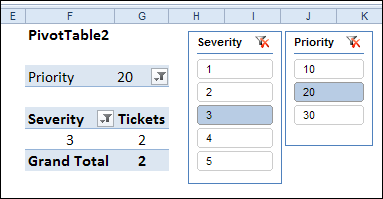
If you don’t have Excel 2010, or don’t want to use Slicers, you can use programming to change multiple pivot table filters with a single click.
Yes, it’s more work than adding a Slicer, but better than manually changing all those pivot tables!
Change All Pivot Tables
Last December, I described how to add code to your workbook, so if you changed one pivot table filter, all the other pivot tables in the workbook would change too.
Click here to read that article, and the comments: Change All Pivot Tables With One Selection
In those comments, people asked how to modify the code, so only the pivot tables on the active sheet were affected, or only a specific field was changed.
In response to those comments, I’ve created a new version of the sample file.
Change All Pivot Tables or Active Sheet Only
The latest sample file for changing pivot table fields has 3 variations on the “Change All Page Fields” code.
It also changes the “Multiple Item Selection” settings to match changed page fields (Excel 2007 and Excel 2010 only).
The three variations are:
- Change any page field in a pivot table, and all matching page fields, on all sheets, are changed.
- Change any page field in a pivot table, and all matching page fields, on the active sheet only, are changed.
- Change a specific page field in a pivot table, and that page field, on the active sheet only, is changed.
Download the Sample File
To see the code, and try the variations, you can download the sample file from the Contextures website. The file will work in Excel 2007 or Excel 2010, if you enable macros.
PT0027 – Change All Page Fields – All Sheets or Active Sheet
You can also download the other sample files, showing how to change a specific field, or all fields, in the workbook’s pivot tables.
PT0008 – Change Multiple Page Fields
PT0015 – Change Multiple Different Page Fields
PT0016 – Change Page Fields With Cell Dropdown
PT0021 – Change All Page Fields
PT0025 – Change All Page Fields with Multiple Selection Settings
______________
Andrews query, sorry I am not sufficiently clever to answer that, however, I suspect the relationship I created is a one to one and won’t work with multiple tables.
Kendra query, yes you would copy in the relevant workbook. However, I suspect a better solution would be to use powerpivot.
Hope that helps.
Hi – after hours of searching I’ve found this blog and PT0027 to update all Pivot tables with change of one Pivot field. It works perfect, tx but with one exception. It doesn*t work if the Pivot field has date format. Any change to get an update? I really would need this function because all my Pivot tables have a date field as filter.
Thanks in advance and sorry for my English.
Sorry again – I use Excel 2007