
There is a new sample file on the Contextures website, with a macro to change all pivot tables with one selection, when you change a report filter in one pivot table.
Change All Pivot Tables
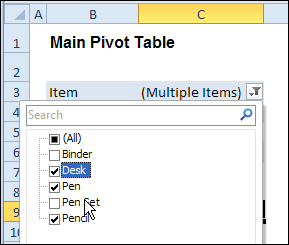
In the sample workbook, if you change the “Item” Report Filter in one pivot table, all the other pivot tables with an “Item” filter will change.
They get the same report filter settings that were in the pivot table that you changed.
Select Multiple Items
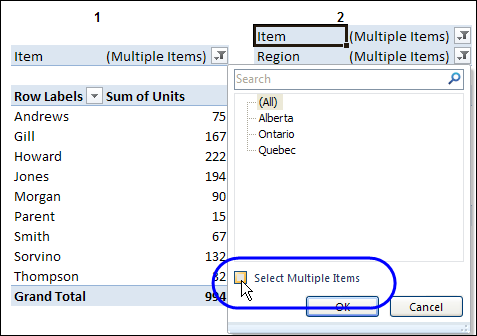
In this version of the sample file, the “Select Multiple Items” setting is also changed, to match the setting that is in the pivot table that you changed.
In the screen shot below, the Item field has the “Select Multiple Items” setting turned off. If any other pivot tables in the workbook have an “Items” filter, the “Select Multiple Items” setting for those fields will also change.
How It Works
The multiple pivot table filtering works with event programming. There is Worksheet_PivotTableUpdate code on each worksheet, and it runs when any pivot table on that worksheet is changed or refreshed.
For each report filter field, the code checks for the Select Multiple Items setting, to change all Pivot Tables with the same report filter field.
The code loops through all the worksheets in the workbook, and loops through each pivot table on each sheet.
Private Sub Worksheet_PivotTableUpdate _
  (ByVal Target As PivotTable)
Dim wsMain As Worksheet
Dim ws As Worksheet
Dim ptMain As PivotTable
Dim pt As PivotTable
Dim pfMain As PivotField
Dim pf As PivotField
Dim pi As PivotItem
Dim bMI As Boolean
On Error Resume Next
Set wsMain = ActiveSheet
Set ptMain = Target
Application.EnableEvents = False
Application.ScreenUpdating = False
For Each pfMain In ptMain.PageFields
  bMI = pfMain.EnableMultiplePageItems
  For Each ws In ThisWorkbook.Worksheets
    For Each pt In ws.PivotTables
      If ws.Name & "_" & pt <> _
          wsMain.Name & "_" & ptMain Then
        pt.ManualUpdate = True
        Set pf = pt.PivotFields(pfMain.Name)
          bMI = pfMain.EnableMultiplePageItems
          With pf
            .ClearAllFilters
            Select Case bMI
              Case False
                .CurrentPage _
                  = pfMain.CurrentPage.Value
              Case True
                .CurrentPage = "(All)"
                For Each pi In pfMain.PivotItems
                  .PivotItems(pi.Name).Visible _
                    = pi.Visible
                Next pi
                .EnableMultiplePageItems = bMI
            End Select
          End With
          bMI = False
        Set pf = Nothing
        pt.ManualUpdate = False
      End If
    Next pt
  Next ws
Next pfMain
Application.EnableEvents = True
Application.ScreenUpdating = True
End Sub
Download the Sample File
To test the Change All Pivot Tables code, you can download the sample file from the Contextures website.
On the Sample Excel Files page, in the Pivot Tables section, look for PT0025 – Change All Page Fields with Multiple Selection Settings.
The file will work in Excel 2007 or later, if you enable macros.
Watch the Video
To see the steps for copying the code into your worksheet, and an explanation of how the code works, watch this short video.
______________________
Thanks for this code. I have a spreadsheet with three pivots filtered using Year and Month. The issue i have is that not all months are populated in each pivot table and when the code runs any pivot table where a particular month can’t be populated is defaulted to (All). Is there any code I can add to default this to (Blank) or “0” not (All)?
Regards
Richard.
Hi Debra.
I have the same question as May Lanie posted on June 27.
I am using OLAP cube as the pivot table’s source and when I change a report filter in one pivot table, all the others pivot tables Pivot table change to “All”
Can you please show us how to revise the code when OLAP cube is the data source?
Thank you!
Loshini
Hi Debra! Thanks for your work! You saved my life 🙂
First off, thanks for great info you share with the community. It’s helped me more than once.
I have an Excel workbook with 3 pivot tables, all connected to an OLAP source.
I’m using a couple of these tables to query the cube so I can copy data selected by the user to another workbook.
Since I don’t want the users to alter the structure or filters in the tables, I’ve locked them down except for the page field on the first table. This allows them to select their project.
My problem: I want to either prevent the user from selecting multiple items in this page field or at least warn them when they do, that the results will be wrong.
I’m using an event procedure that fires when the user changes anything on the sheet:
Sub Worksheet_Change(ByVal Target As Range)
In this procedure, I’m trying this code to get/set this property:
Dim bMult As Boolean
‘ check for users changing “select multiple items” box on page fields
bMult = Sheets(“Sheet1”).PivotTables(“PivotTable1”).PageFields(1).EnableMultiplePageItems
If bMult Then
MsgBox “You have enabled multiple project selection which could lead to erroneous results!”
End If
‘ Try to set the property
ActiveWorkbook.Sheets(“Sheet1”).PivotTables(“PivotTable1”).CubeFields(1).EnableMultiplePageItems = False
Both of these result in errors at the step where I try to read or write the property. I’ve tried PageFields, PivotFields, CubeFields, with no success.
In the debugger, when I look at this property in the locals window, it always shows as False regardless of how it is actually set in the pivot table.
Any ideas?
I’m running Excel 2010 on Windows 7 64bit.
Hi Debra,
Any Luck with the OLAP query?
Thanks!