
There is a new sample file on the Contextures website, with a macro to change all pivot tables with one selection, when you change a report filter in one pivot table.
Change All Pivot Tables
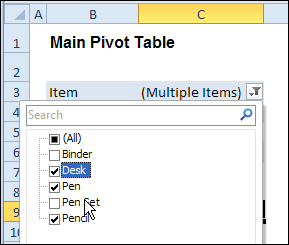
In the sample workbook, if you change the “Item” Report Filter in one pivot table, all the other pivot tables with an “Item” filter will change.
They get the same report filter settings that were in the pivot table that you changed.
Select Multiple Items
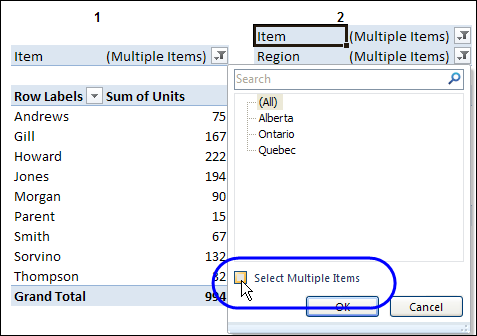
In this version of the sample file, the “Select Multiple Items” setting is also changed, to match the setting that is in the pivot table that you changed.
In the screen shot below, the Item field has the “Select Multiple Items” setting turned off. If any other pivot tables in the workbook have an “Items” filter, the “Select Multiple Items” setting for those fields will also change.
How It Works
The multiple pivot table filtering works with event programming. There is Worksheet_PivotTableUpdate code on each worksheet, and it runs when any pivot table on that worksheet is changed or refreshed.
For each report filter field, the code checks for the Select Multiple Items setting, to change all Pivot Tables with the same report filter field.
The code loops through all the worksheets in the workbook, and loops through each pivot table on each sheet.
Private Sub Worksheet_PivotTableUpdate _
  (ByVal Target As PivotTable)
Dim wsMain As Worksheet
Dim ws As Worksheet
Dim ptMain As PivotTable
Dim pt As PivotTable
Dim pfMain As PivotField
Dim pf As PivotField
Dim pi As PivotItem
Dim bMI As Boolean
On Error Resume Next
Set wsMain = ActiveSheet
Set ptMain = Target
Application.EnableEvents = False
Application.ScreenUpdating = False
For Each pfMain In ptMain.PageFields
  bMI = pfMain.EnableMultiplePageItems
  For Each ws In ThisWorkbook.Worksheets
    For Each pt In ws.PivotTables
      If ws.Name & "_" & pt <> _
          wsMain.Name & "_" & ptMain Then
        pt.ManualUpdate = True
        Set pf = pt.PivotFields(pfMain.Name)
          bMI = pfMain.EnableMultiplePageItems
          With pf
            .ClearAllFilters
            Select Case bMI
              Case False
                .CurrentPage _
                  = pfMain.CurrentPage.Value
              Case True
                .CurrentPage = "(All)"
                For Each pi In pfMain.PivotItems
                  .PivotItems(pi.Name).Visible _
                    = pi.Visible
                Next pi
                .EnableMultiplePageItems = bMI
            End Select
          End With
          bMI = False
        Set pf = Nothing
        pt.ManualUpdate = False
      End If
    Next pt
  Next ws
Next pfMain
Application.EnableEvents = True
Application.ScreenUpdating = True
End Sub
Download the Sample File
To test the Change All Pivot Tables code, you can download the sample file from the Contextures website.
On the Sample Excel Files page, in the Pivot Tables section, look for PT0025 – Change All Page Fields with Multiple Selection Settings.
The file will work in Excel 2007 or later, if you enable macros.
Watch the Video
To see the steps for copying the code into your worksheet, and an explanation of how the code works, watch this short video.
______________________
I’m not sure who to give credit to still – Debra, Jeff (I work with another Jeff Weir, strangely enough), et al, but this worked perfectly and I didn’t even have to modify the code! One of the best tools so far, and that I will use often.
Rob
@Robin, thanks, and I’m glad the code will help you!
Hi all,
I’m on xl2013 – I copied and pasted and it worked perfecto. Then I “refreshed all” and it gave a warning asking a question which of course I ignored, when I checked, all the pivots and all the filters were completed empty!?! (i.e. they show “All”) Now when I change a filter the code doesn’t work 🙁 what have I done?!
I like this code a lot. I have about 10 pivot tables on 4 different worksheets. It is only updating one of them and it is switching the rest to “ALL”. How can I make it so they all change to the filter i.e. Year: 2013 instead of switching to “ALL”?
Excel 2013. Having same issue with this code updating the one pivot table (on current sheet) and setting the rest to “ALL”. Note: I am using PowerPivot with a Data Model from 11 different tables. Three of those tables are large and linked from a SQL database. Not sure which of these things is causing the code to not work; PowerPivot with 11 table data model or link to SQL database. Would love any help. Happy Holidays!
Hi – working with an excel worksheet from last year that has many pivots all of which have different filters, fields, subtotals (e.g., some with sums, counts, average, etc.). I’m looking for a way to swap out 1 field easily from the 100s of pivots that I have setup without having to do each pivot 1 by 1.
For example the column in last year’s datasource is named “2013 Salary” and I want my pivots to now use the “2014 Salary” column but maintain the same functionality in all pivots.
Is there a way to easily do this? If I simply rename the column in the datasource and refresh, the 2013 field will disappear altogether from all of my pivtos.
Thanks!
This has been a fabulous help to me! Thanks so much for sharing this code, and the video. I know that this was done a while back, but sometimes it’s nice to know that work you did a while back is still helping people out today!
Thanks James! I’m glad the code is still helping people, and thanks for letting me know that it worked for you.