
How can you quickly move around an Excel worksheet? In a long sheet, there’s no built-in way to go to a specific part of the Excel worksheet. Even though the sheet might print on several pages, Excel doesn’t have “page” navigation.
Go To Specific Page in Excel
Here’s what Andrea asked in a recent comment:
- How do I “go to” a specific page of my worksheet. I have 23 pages and do not want to keep scrolling. I cannot find how to do this as on Word.
Of course, Andrea is correct, and there is no built-in page navigation for Excel, like Word has. What would you recommend for Andrea? Here are a couple of my favourite techniques, and please add your suggestions in the comments.
Navigating in Microsoft Word
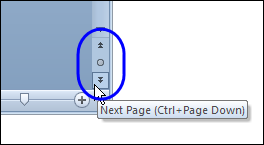
In Word, you can click the buttons at the bottom right, to quickly go to the next or or previous page.
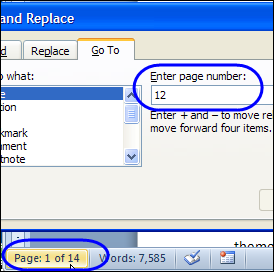
You can also double-click on the page count section of the status bar, type a page number, and press Enter, to go to a specific page.
Worksheet Pages in Excel
In Excel, we don’t have those handy page navigation features. You can scroll down through the rows, with no hint as to what page you’re on, if the worksheet has multiple printed pages.
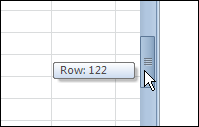
Or, add the page number to the header or footer, and scroll in Page Layout view, where you can see those numbers.

Create a Table of Contents
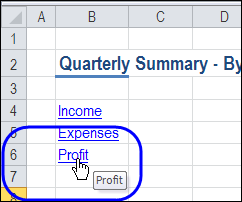
If you’d like a structured way to move around the worksheet, you can create a worksheet table of contents.
With this technique, you add section headings, with hyperlinks to those headings, at the top of the worksheet.
Then, click a hyperlink, to go to that section.
Create Named Ranges
For a quicker and easier method, you can skip the hyperlinks, and simply go with named ranges.
If you’re the only person using the workbook, you could use this simple navigation system.
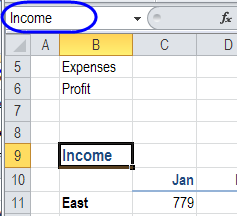
In a long worksheet, you would most likely have heading cells, which you can name. In this screenshot, cell B9 is named as Income.
Go to Named Range
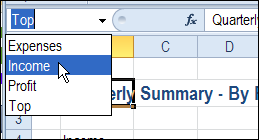
Then, go to any named range, by selecting its name from the Name Box drop down list.
Other Ways to Navigate
Excel isn’t set up to deal with page navigation, but one of these suggestions might help Andrea work around this limitation. Do you have other techniques that you use in large worksheets?
_____________
Once you have some named formulas set up to refer to your key ranges, the keyboard shortcut F5 is a great way to go to it.
Even better: hit F5, then Tab, then the first letter of the range you want.
Or possibly…
1. Set the worksheet zoom (magnification) setting to 50%
2. Use Page Break Preview
‘–
Jim Cone
Portland, Oregon USA
http://www.mediafire.com/PrimitiveSoftware
(Formats & Styles xl add-in: lists/removes unused styles & number formats) – free
There is an add-in available on this very web site that allows you to alphabetically sort your worksheets and then provides a handy drop down list from which you make a selection. You are then taken to your selected worksheet. I find this add-in invaluable for workbooks which have in excess of 10 worksheets.
Right-Click on the navigation arrows at the bottom left-hand side, and a list of the sheets will pop-up.
Debra – View > Page Break Preview is also my vote, but I’m curious. Do you know why Andrea finds it necessary to go to different pages of a worksheet? Is Andrea willing to share a sanitized version of the worksheet?
Besides you can use simple macro to activate your desired worksheets.
Sub SheetActivate()
‘assigne shortcut Key
If Application.CommandBars(“workbook tabs”).Controls(16).Caption Like “More Sheets*” Then Application.SendKeys “{end}~”
Application.CommandBars(“workbook tabs”).ShowPopup
End Sub