
There are Excel formulas and User Defined Functions (UDF) that can change numbers into words. Those are handy if you’re typing a number into a workbook, and want the written amount to be shown, as it might appear in a cheque. Have you ever tried to do the opposite – change words to numbers in Excel?
Words to Numbers
It’s a tricky process to change words to numbers in Excel, and Excel MVP, Jerry Latham, has created an Excel UDF – WordsToDigits – to help you out.
With the WordsToDigits UDF, you can create a worksheet formula to translate words into their numeric value. For example:
- Five hundred fifty-two becomes 552
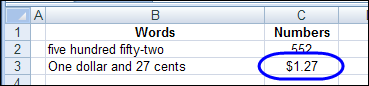
- One dollar and 27 cents becomes 1.27
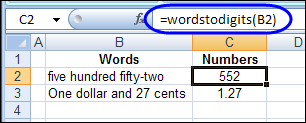
In the first example, the words are in cell B2, and the formula in cell C2 is:
=WordsToDigits(B2)
You can format the formula results in any number format you want, such as general numbers, numbers with thousands separators, or currency.
Refer to Worksheet Cells
Although the WordsToDigits UDF is quite flexible, it only works with cell references, not text strings. For example, this formula in cell C2:
=WordsToDigits(“twelve”)
will result in a #VALUE! Error.
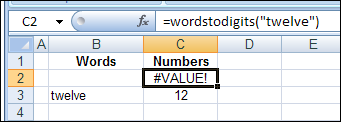
However, if you type “twelve” in cell B3, and refer to that cell in the formula, the result is correct. Here is the formula that’s entered in cell C3:
=WordsToDigits(B3)
WordsToDigits Tips
Jerry passed along these tips, for working with the WordsToDigits UDF:
- It can handle numbers up to 999,999,999,999,999.
- The accuracy of any decimal portion decreases as the number of digits increases. But at normally used value ranges such as up through millions, this should not be a significant issue.
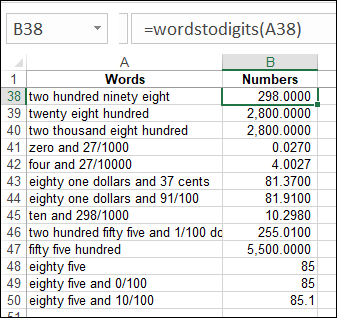
- Any fractional parts of a number must be entered as digits, as:
- six and 7/100
- twelve hundred dollars and 27 cents
- Misspelling of numeric words will result in them being interpreted as zero, so typos can give inaccurate results.
Note: The WordsToDigits UDF is based on the short scale system of naming large numbers.
Experiment With the WordsToDigits UDF
You can download Jerry’s workbook, to see the UDF code, and his examples of how to use the function.
Go to Jerry’s Sample Files page on my website. Then, in the VBA section, look for JL0001 — Words to Numbers in Excel.
To test the UDF, you can create your own entries on the workbook’s Sample Entries sheet.
If you have questions or comments, please share them with Jerry, in the comments below.
___________________
Words to Numbers in Excel
if possible this tamil ? number to words
Hey,
Looks very useful, I just followed the guidance but i got the same error “#Name?”
@Raza, @SHAIK, @Jay — Did you see a Security Warning message when you opened the file, asking you to enable macros? If not, your security setting might be High, and the macros aren’t working, so the formula result is an error.
What a great sharing in a simple manner.Very nice
http://xcell05.free.fr/morefunc/english/nbtexte.htm
another option which worked…
Hi
can i get any other command in excel which is opposite like digitstowords?
Thanks in advance