
There is a list of Excel books on my Contextures website, and it hasn’t been updated recently. Today, I checked Amazon, to see what new and exciting Excel books had been released, so I could start adding them to the list.
New Excel Book
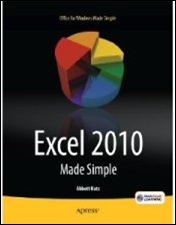
There’s a book – Excel 2010 Made Simple, by Abbott Katz — with a release date of May 31, 2011, from Apress, the publisher of my pivot table books.
Amazon lists the book as “not yet released”, but they show the cover, which you can see below.
Excel Charts Chapter
One of the chapters is on Excel charts, and the book blurb promises that you’ll learn “How to create colorful, meaningful charts”.
I hope the cover chart was selected by someone in the Apress marketing department, and not the author!
Missing Books
I’ll be updating the list of Excel books over the next few weeks, so if you know of any recent books that are missing from the list, please let me know, so I can include them. Thanks!
Make a Simple Pie Chart
And if you do need to make a pie chart in Excel, for a business report, or for the cover of your next book, keep it simple!
This video shows how to make a basic pie chart in Excel, then add formatting, labels, and other features. Use your Excel charting powers for good, not evil!
Excel Chart Links
If you want to learn more about Excel chart, but not the 3-D rainbow-coloured kind, check out the tutorials at the following links:
Box Plot Chart (Box and Whisker)
____________
I wouldn’t buy it, and I probably wouldn’t even take it off the shelf to look inside. That “chart” looks more like “Excel Made Stupid”.
Jason,
I agree that the cover should be visually appealing, and that it helps sell the book, yes. But I’m not in the camp that any advertising is good advertising. There are loads of examples out there of great looking, functional and effective charts on the web. Jon and Chandoo’s sites are two that immediately jump to mind as repositories.
Flash and sizzle is absolutely important, as a book is often being judged by it’s cover (as we’re doing now.) But so is the credibility of the author amongst both the purchasing audience and his/her peers. (The peers are very often people who recommend the book to potential customers.)
My feeling is that Marketing people are there to market, but often lack the deeper knowledge of the subject matter expert. It is up to that person to pull the marketing people back and tell them (in this case) “I like your idea, but could we use a more effective chart type so it doesn’t compromise my standards?” I’ve been sold bills of goods in the past, and it’s not a good feeling. As Jon points out, you can’t even build the featured chart in Excel. That may not have been an issue in the past, but with the full feedback systems we have now, you risk a 1 star review on Amazon.
To be clear, I haven’t read the book, and don’t know the author. I even hope the book sells well for him. This is meerly meant as constructive criticism of the choice of artwork by whomever decided.
Let me ask a dumb question. Are you sure you can’t build a chart like that in 2010 (I don’t have 2010) with some creative VBA? I’m guessing the designer didn’t use any native 3D charts in Excel because none them were visually stimulating.
Great discussion.
Visually stimulating or not, one should not use 3d charts, period. With any luck, a future added protocol to the Geneva Convention will list them as “crimes against data.”
“Crimes against data”! Beautiful!
Jason, haven’t tried. I avoid both 3D and pie charts unless mandated to use them by my bosses boss. And even then I argue vehemently.
From a technical point, I don’t believe that you can build them, as Excel separates wedges rather than stacks them up, but you never know. Maybe you could do it by creative use of an area chart. Regardless, even if you could, you shouldn’t. 😉
A stacked, 3D, pie chart in stair step format could be very informative if it used color fading.
The color fade would illustrate the rate at which each pie segment’s value was accumulated.
I knew there had to be a use for the additional colors available in xl2007 & 2010.