
With dependent data validation, you can make one drop down list depend on the selection in another cell.
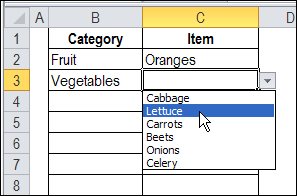
For example, select Vegetables as a category in column B, and you’ll see a drop down list of vegetables in column C.
Problems With INDIRECT
This dependent drop down technique uses the INDIRECT function, to return the range with the name Vegetables.
The technique works well with a static named range, but the INDIRECT function doesn’t work with a dynamic range.
Dynamic Range Example
For example, in the workbook shown below, there is a dynamic range named NumList, with the formula:
=Admin!$A$1:INDEX(Admin!$A:$A,COUNTA(Admin!$A:$A))
SUM For Dynamic Range
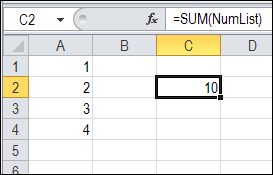
You can SUM the dynamic named range, using the following formula in cell C2:
=SUM(NumList)
The dynamic range doesn’t cause any problems, and the result is correct — the sum is 10.
Error with INDIRECT
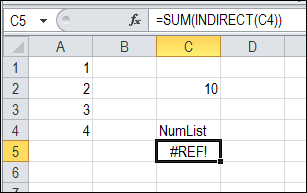
However, if you use the INDIRECT function within the SUM function, the result is a #REF! error.
=SUM(INDIRECT(C4))
Dependent Data Validation Workaround
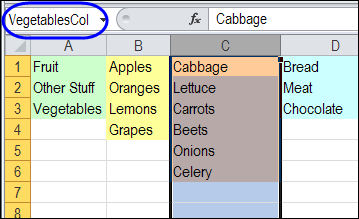
Instead of using dynamic ranges with dependent data validation, you can use a named starting cell (Vegetables) and named column (VegetablesCol).
Data Validation Formula
Then, refer to those named ranges in the dependent data validation formula.
=OFFSET(INDIRECT($B2),0,0, COUNTA(INDIRECT(B2&”Col”)),1)
You can see this example, and a formula that substitutes invalid characters, on my Contextures website, on the dependent data validation page.
___________
Is there any way to allow a cell to sometimes use a list for data validation and at other times to allow free data entry? In other words using your data above, with an entry of vegetables in B3 I get a list in C3. But perhaps the list is too variable for Fruit so I want the C2 cell to allow a free text entry. Thus the data validation method in column C is dependent of the value in column B.
I have a data validation in a row in a way that 10 digit nos. only are entered in the cells. However now i would also like that there are no duplicate entries made in cells in the same column.
I use the countif function for restricting duplicate entries.
Can you help me with this problem ????