
If you’re building an Excel workbook, in which users with basic Excel skills will enter data, would you create a worksheet data entry form?
In the screen shot below, you can see an example.
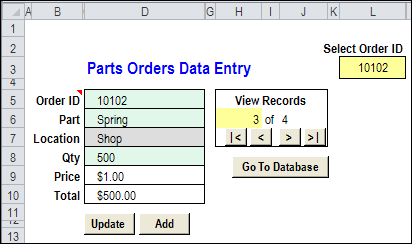
Excel UserForm
Or, do you prefer to build an Excel UserForm?
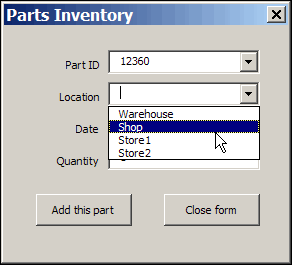
In the screen shot below, you can see a simple UserForm.
Worksheet Data Entry
With the worksheet method, you can
- hide the data sheets, and protect the data entry sheets, so users can only enter data in the unlocked cells.
- add a few navigation and function buttons, to help users with basic Excel skills.
An advantage is that you’re using built-in Excel features, like data validation and formulas, so you can reduce the development time.
Excel UserForm
The UserForm method takes longer to develop, because you’re adding another layer to the project. Advantages to this method include:
- combo boxes, which can be formatted, and have autocomplete (unlike data validation drop downs)
- tab order control, which isn’t available on the worksheet, where pressing the Tab key simply takes you to the next unlocked cell.
Which Would You Pick?
Both methods work well, and can be customized to be user-friendly and fool-resistant (nothing in Excel is fool-proof!) Programming would be required in both versions, to help with navigation, and to move data to the storage worksheets.
- The worksheet method is quicker and easier to create and maintain, and a project might take 4-5 hours to complete.
- The UserForm method is more sophisticated, and takes longer to build and maintain. The UserForm version of the same project might take 8-10 hours.
Which method would you use?
____________
Do userForms allow calculated cells (that is, for example a multipication of data in one cell by data in another cell in the same UserForm)? If so, where can I locate a description on how to do it?
A multiplication appears to be a rather normal task in a Worksheet Data entry.
Hi Debra,
I’m building a userform that refers to cells in my worksheet that have built in data validation. Is there a way to make the userform validate the data using the cell data validation? If I set the textbox’s ControlSource to the relevant cell, the text box accepts data that violates the cell data validation, and the cell ends up with invalid data. I don’t want to duplicate all the different data validations in userform code. Do you know an elegant way to ensure that the underlying cell validation is performed for all the textboxes in the userform that are linked to worksheet cells?
I see that the the form created by Excel when I click Data/Form… performs the validation, so there must be a way – though maybe it’s not so elegant
Thanks for our help
Martin
Hai Debra,
I need your help. My input Data worksheets at “D6:D8” i Set formula . When I use search and update the formula is gone . How could I fix it .But if i use add button the formula not clear.
Sherry, I’m not sure which version of the worksheet data entry form you’re using. However, there should be a macro named ClearDataEntry, and it has a section where the data entry cells are cleared.
It should be clearing only the cells that contain constants:
You could look for other sections in the code that have a “.ClearContents” and make sure they’re doing the same thing.