
Do you ever open an Excel workbook, and find that tragedy has struck your comments? You spent hours inserting those comments, and making them just the right size and shape. Then, for no apparent reason, everything changes. Comments are in the wrong place, and wrong size. Here’s how to fix those wandering Excel comments.
Wandering Excel Comments
This screen shot shows an example of wandering Excel comments, and incorrect comment sizes.
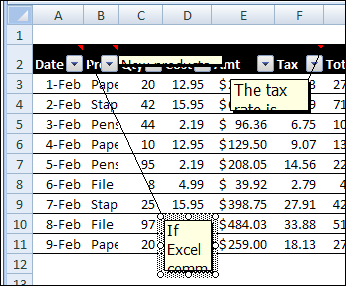
- Some comments have flattened to a thin line.
- Other comments are so small that you can barely read the first word.
- A few comments have wandered far from their cell, and the connecting line stretches across the entire window.
What a mess! Fortunately, you can quickly get things back in place, by using an Excel macro or two. Use the sample macros below, to fix wandering Excel comments, and to make them the correct size again.
Put Comments Back in Place
If your comments have slithered across the spreadsheet, you can use this macro to put them back in their parent cell.
Sub ResetComments()
Dim cmt As Comment
For Each cmt In ActiveSheet.Comments
   cmt.Shape.Top = cmt.Parent.Top + 5
   cmt.Shape.Left = _
      cmt.Parent.Offset(0, 1).Left + 5
Next
End Sub
Get Comments Back in Shape
For comments that have shrunken to thin slivers, you can use this macro to get them back to a normal size.
Sub Comments_AutoSize()
'posted by Dana DeLouis  2000-09-16
Dim MyComments As Comment
Dim lArea As Long
For Each MyComments In ActiveSheet.Comments
  With MyComments
    .Shape.TextFrame.AutoSize = True
    If .Shape.Width > 300 Then
      lArea = .Shape.Width * .Shape.Height
      .Shape.Width = 200
      ' An adjustment factor of 1.1 seems to work ok.
      .Shape.Height = (lArea / 200) * 1.1
    End If
  End With
Next ' comment
End Sub
More Excel Comment Macros
For more Excel comment macros, please visit the Excel Comment VBA page on the Contextures website.
____________
I tried to install the macros but, when I click alt-F11 nothing happens. This is all new to me. Never installed a macros before. I just want my comments in excel sheet to quit wandering. lol
Thank you so much for this – saved me ages!
Thanks. Worked wonderfully
Just want to leave my thanks as well. And to whomever left the 5-minute You Tube tutorial. My comments never looked so nice and uniform.
Wonderful, thanks alot! We had a colleague who had tonnes of comments on a single excel document with frozen panes and hidden columns/rows and jumping and hidden comments all over the place.
This helped to save her the time to re-order all of it again!
For years I’ve put up with “disconnects” between cells and the associated comments. Just used your Reset Comments macro – fantastic!! Many thanks.