
Do you ever open an Excel workbook, and find that tragedy has struck your comments? You spent hours inserting those comments, and making them just the right size and shape. Then, for no apparent reason, everything changes. Comments are in the wrong place, and wrong size. Here’s how to fix those wandering Excel comments.
Wandering Excel Comments
This screen shot shows an example of wandering Excel comments, and incorrect comment sizes.
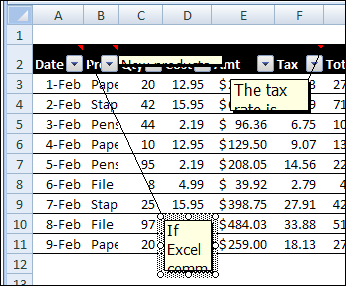
- Some comments have flattened to a thin line.
- Other comments are so small that you can barely read the first word.
- A few comments have wandered far from their cell, and the connecting line stretches across the entire window.
What a mess! Fortunately, you can quickly get things back in place, by using an Excel macro or two. Use the sample macros below, to fix wandering Excel comments, and to make them the correct size again.
Put Comments Back in Place
If your comments have slithered across the spreadsheet, you can use this macro to put them back in their parent cell.
Sub ResetComments()
Dim cmt As Comment
For Each cmt In ActiveSheet.Comments
   cmt.Shape.Top = cmt.Parent.Top + 5
   cmt.Shape.Left = _
      cmt.Parent.Offset(0, 1).Left + 5
Next
End Sub
Get Comments Back in Shape
For comments that have shrunken to thin slivers, you can use this macro to get them back to a normal size.
Sub Comments_AutoSize()
'posted by Dana DeLouis  2000-09-16
Dim MyComments As Comment
Dim lArea As Long
For Each MyComments In ActiveSheet.Comments
  With MyComments
    .Shape.TextFrame.AutoSize = True
    If .Shape.Width > 300 Then
      lArea = .Shape.Width * .Shape.Height
      .Shape.Width = 200
      ' An adjustment factor of 1.1 seems to work ok.
      .Shape.Height = (lArea / 200) * 1.1
    End If
  End With
Next ' comment
End Sub
More Excel Comment Macros
For more Excel comment macros, please visit the Excel Comment VBA page on the Contextures website.
____________
I use a variation on this that I wrote myself, differences being:
1) I set the width/height based on parsing the comment text into numbers of characters and numbers of carriage returns to estimate it that way
2) I insert at the top of the comment a date stamp, which gives a record of when it was raised, and hence how old it is.
You just saved me 15-20 minutes
Thank you so much!
Amazing, this has saved me hours. I have a macro that can insert thousands of comments and some some reason a portion of these decided to change size and move hundreds of rows away. This has cleaned it all up!
Thank you!!!
I was completely new to macros with a huge spreadsheet full of comments.
You saved me 2 days of my life
THANK YOU!!!
P.S I worked out what to do with your code here http://www.youtube.com/watch?v=8pfdm7xs3QE
Thank you for this link to what the heck to do with the macro! So helpful.
This whole discussion is saving my sanity..
Had to resort to Google as IT could not fix this issue at work. Thank you so much for saving my spreadsheet!
Don’t know the first thing about macros and can’t even spell VBA, but being able to cut-and-paste your code fixed a long-standing problem for me. I’m very grateful. Y’all done good!