
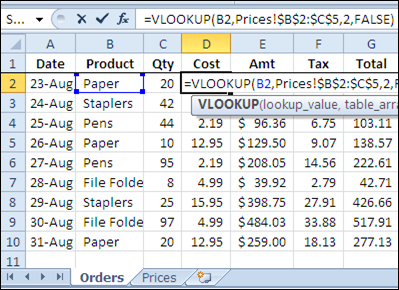
If you’re filling in an order form in Excel, you can use the VLOOKUP function to find the selling price for each item in the sales order. For example, in the screen shot below, the order form is on the Orders worksheet, and a VLOOKUP formula in column D pulls the cost from a pricing table on the Prices worksheet.
Lookup Range in Another Workbook
However, you might want to keep your price list separate from the orders workbook, so the prices are easy to update. If your price list is in a different workbook, you can still use a VLOOKUP formula to pull the data, by referring to the external list.
To refer to another workbook in a VLOOKUP formula, follow these steps.
- Open both workbooks (this step isn’t mandatory, but makes it easier to create the link)
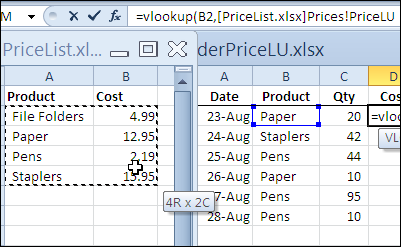
- Create the VLOOKUP formula, and for the table_array argument, select the lookup range in the other workbook. Excel will automatically add the other workbook’s name and the worksheet name in the formula.
In the screen shot below, the lookup table is in the PriceList.xlsx workbook, on the Prices sheet, in a range named PriceLU.
Closing the Lookup Workbook
While the price list lookup table workbook is open, the VLOOKUP formula will show the workbook name and the referenced range address or range name.
You can see the PriceLU name and workbook information in the formula bar, in the screen shot below.

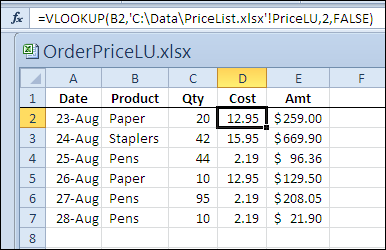
If the price list lookup table workbook is closed, the VLOOKUP formula will still work, and the full file path for the price list lookup table workbook will be shown in the formula.
Watch the Video
To see the steps for referring to a VLOOKUP range in another workbook, please watch this short Excel tutorial video.
More Lookup Links
VLOOKUP Number/Text Troubleshooting
_____________
Hi
I have been reading your blogs for sometime and I just wanted to thank you for your tremendous contribution and acknowledge that though there are many MVPs in the field writing blogs but you are the best in your area especially with this added feature of videos as it makes lot easier to understand the whole concept. However, I would really appreciate if you can provide some material on the excel charting because as I said there many bloggers we would like Debra to teach us charting skills in her typical easy to understand style alongwith videos.
Here I tried to access above link but found the below message:
Not Found
Sorry, but you are looking for something that isn’t here.
Thanks and kind regards
Fakhar
I understand this. What I am trying is looking up info from a workbook with multiple sheets. Any suggestions?
Hi David,
To look up info from a different worksheet in the same excel file, approach is just the same – as a “table_array” you just select the area in different worksheet and the rest of steps is exactly the same.
Fantastic presentation – Thank you very much. Now a question: Is it possible to get the ‘found data’ to show up in the same colour text as that of the source cell, if the source cell varies in different rows in the source workbook?
Thanks, this is a great tutorial!
Could you tell me how I’d alter the formula to look up a value on another spreadsheet that is created on a daily basis but that is always in the same format (eg ‘prices 28/08/2012’)?
It would always be called prices folowed by today’s date, could I use the fomula ‘today()’ in the file lookup?
Thanks
Hi, were you able to find an answer on this? I am stuck at the same place.
This Instructions are user friend. Thank you.
Hi gurus,
i have issue with Vlookup formula, my case is;
i am using different file to pick a value against the reference field, and file name change is depend on field A1 in master file, so i want some adjust in Vlookup formula regarding file name means file name should automatically
change when value of A1 change.
other details,
A1 value = file name
Indirect function used but limited as required fie should open.
‘IF’ function can not be used bcoz the number of file are greater the 8.
pls guide.
regards
Muhammad shoaib
Hi Shoaib,
M searching answer for the same query. Have you got the answer??
If u got the answer can you please please tell me or reply on this comment…………
Thanks in advance.. 🙂
Me too!!!!!!! Exact same issue. Ughh