
Every now and then I get a workbook from a client with numbers in Accounting format. If all the numbers are the same length, the currency symbols line up nicely. However, if the numbers are different lengths, we have trouble aligning Excel currency symbols.
Currency Symbols Do Not Line Up
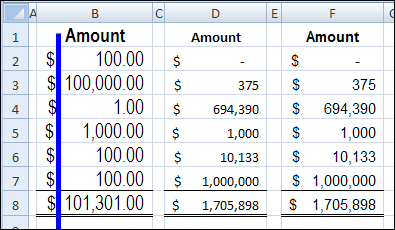
For example, in the screen shot below, the $ sign in cell B4 is a bit to the right of the symbol in B5. It’s not much, but it looks sloppy, and some fonts show the effect more obviously than others. I added the blue line to make it easier to see the variations in column B.
Trying to Fix It
I’ve spent way too much time trying to fix the problem, with custom formatting, different fonts, and yelling. Even fist shaking didn’t help — very odd!
So, I learned to live with the problem, and tried to convince the client to use Currency format instead. The dollar signs aren’t supposed to line up in that format, so it’s much less stressful.
Finding the Solution
Finally, this weekend, after another attempt at lining up the dollar signs, I found the solution to the wobbly Accounting symbols. I checked the horizontal alignment for the cells, and discovered that my client had formatted them as Right aligned.
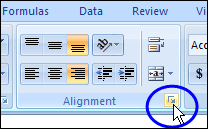
I clicked the button at the bottom right of the Alignment group on the Ribbon’s Home tab, to open the Format Cells dialog box.
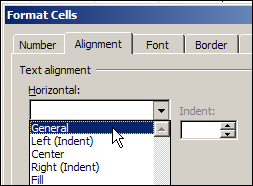
Then, on the Alignment tab, I changed the Horizontal alignment to General, and clicked OK.
Problem Solved
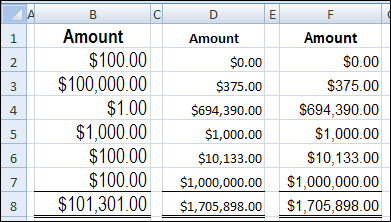
Miraculously, all the dollar signs lined up, without a single wobble, for the different font and sizes.
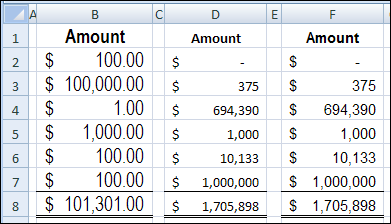
I’m not sure why the right alignment had been applied earlier, because numbers would automatically align to the right. Anyway, the alignment is the first thing I’ll check, the next time I have trouble with wandering currency symbols.
And if you already knew how to fix this problem, you should have told me years ago!
______________
Amazing! I can’t believe it’s such a simple solution. I also can’t believe the many times I have googled this and this is the first time it has appeared!! Thank you for sharing.
Or use accounting format and it does it automatically.
The quickest solution was accounting… Thx..
I want dollar signs aligned at far left. Not a problem unless you want to show zero amounts. Then they just show blanks instead.
Instead of $ 0.00 it becomes $ –
I have a similar problem and have been unable to find a solution. I am trying to format a balance sheet and put a $ to the far left for the first number in the column, but not a symbol for the rest of the numbers in the column, until the last number in the column. I can not get the first and the last number’s to align in even columns right justified, the numbers with the $ are off centered. Any suggestions?
Holy cr*p I spent way too much time on this problem! Then did a simple Google search (should have done that first), and found your answer. Bang! Fixed. You’re a legend, thanks for posting the solution.
Now to go see someone about my OCD. Silly dollar signs!
@Jason, you’re welcome! At least you weren’t obsessed enough to write a whole article about the dollar sign problem, like some people. 😉
Thank you Debra for posting this solution! It’s great to finally eliminate the wandering symbols. Not sure why your solution is not the Excel default setting.