
You can create order forms and price lists in Excel, and automatically show a price when a product is selected in the order form. But what happens if you want to give some customers special pricing, or offer sales pricing occasionally? Here’s how to customize your Excel price list with VLOOKUP and MATCH.
Using the VLOOKUP Function
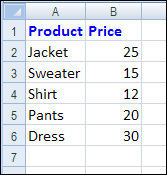
With a simple VLOOKUP function in Excel, you can pull a product price from a lookup table. For example, if a customer orders a jacket, the price is 25, based on this lookup table. The lookup table is a named range, ProductLookup.
To show the price after a product is selected in an order form, use a VLOOKUP formula to find that product in the lookup table. For example:
=IF(B11=””,””,VLOOKUP(B11,ProductLookup,2,FALSE))
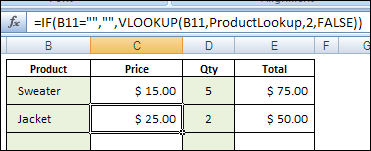
If cell B11 is empty (no product has been selected), the formula result is an empty string, and cell C11 will appear empty.
If a product has been selected in cell B11, the VLOOKUP formula finds the price in column 2 of the ProductLookup table.
Select a Variable Column
In the simple example shown above, the price will always come from the second column of the lookup table.
To use variable pricing, you could create a lookup table with two or more columns of prices, instead of just one.
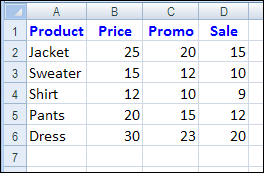
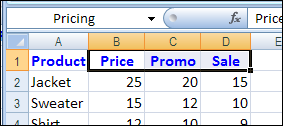
In this example, the ProductLookup table has four columns, instead of two – Product, Price, Promo and Sale.
Select a Pricing Type
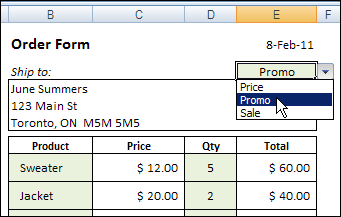
On the order form, add a drop down list where you can select one of those pricing types – Price, Promo or Sale.
Change the VLOOKUP
Then, in the VLOOKUP formula, replace the column number with a MATCH formula.
=IF(B11=””,””,VLOOKUP(B11,ProductLookup,MATCH($E$4,Pricing,0)+1,FALSE))
The MATCH formula finds the pricing type selected in cell E4, in a range named Pricing (cells B1:D1 in the lookup table).
How It Works
If Promo is selected, the MATCH formula returns a 2, because Promo is the second item in the Pricing range.
You’ll add 1 to that number, because the ProductLookup table has one column to the left of the pricing columns.
So, 2 + 1 = 3, and the promo pricing will come from the 3rd column of the ProductLookup table.
Watch the VLOOKUP / MATCH Video
To see another example of using MATCH with VLOOKUP, watch this short video.
____________
Vlookup can only work in forms but cant be used to keep records of sales. This is because whenever there is a price variation, previous records kept with the previous price will also change.
Is there any way one can change the prices in a vlookup table without corresponding changes in the prices of the previous record kept? I will be grateful if an copy of excel worksheet and formula is posted
Thank you in anticipation.
Did you find a solution to your problem?
Hi,
I have several tables with prices of different flights.
Different tables range from Airline1 – Adult rates, Airline 1 – Child rates, Airline 2 – Adult rates, Airline 2 – Child rates, and so on.
Now, the above doesn’t seem to work as it looks more like a distances table, with prices going horizontally and vertically.
So really I need to have an Index-Match thing but which knows how to choose from which table according to which table you need.
For: instance Airline 3 – Child rates- Mumbasa – Cairo – Result
Can you help ?
Thanks in Advance.
Have you solved the requested raised issues, please i do have same issue, could you please help me.
Thanks.
I am also stuck on this issue, did anyone find a solution ?
IF IHAVE TWO PRODUCT COLUMNS CONTAINING PRODUCT NAME WITH PRICE I.E TOTAL 4 COLUMNS(2 COLUMNS WITH THEIR PRICEINFRONT OF THEM ) HOW TO USE VLOOKUP FORMULA IN INVOICE. THIS BCOZ I AM HAVING MUTILPE ITEM E.G 500 PRODUCT,ITS PRICE LIST.PLZ SUGGEST PROPER FORMULAS FOR THIS. THKS IN ADVANCE
I have a (EXCEL 3500 lines) price list for parts on all makes and models of cars.
can i get a database that will allow me to search a particular make, model and part?
I currently have to search through a printed version for the particular part to fit a particular make, model,
HI.. I have created a Invoice In excel 2007. My data is Customer name with address & product details. The products are same but the price is different for each customers. My requirement:
When I enter customer code in the invoice it should display the products and its price based on the price set for the customer.
I have a price table that has 4 columns in it, but when I select my 3rd pricing type (Sale in the example), the result comes back as #N/A. Whenever I select my other two pricing types, the results come back and are correct.
What can I do to fix this?