
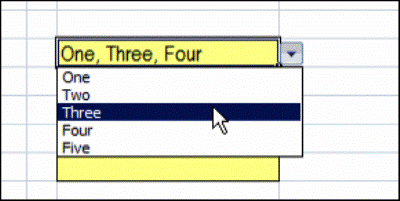
You’ve probably used an Excel data validation drop down list, where you can click the arrow, and select an item to fill the cell. With a bit of programming, you can customize a drop down list, to select multiple items.
Single Selection Drop Down
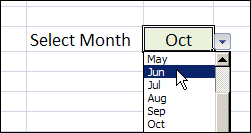
By default, data validation drop downs only allow you to select one item.
In the worksheet shown below, you can select a month from the drop down, and it overwrites any previous selection in that cell.
Select Multiple Items From the Drop Down List
Instead of limiting users to a single selection, you can use a bit of programming, combined with the data validation list, and allow multiple selections.
You can display all the selected items across a row, or down a column, or keep them in the same cell.
Keep reading, to see some examples of this technique, and how it works.
There is also a video that shows the multiple selection drop down list. To try it for yourself, follow the download link f
Watch the Data Validation Video
To see these techniques, and a few other multiple selection examples, you can watch this short video.
_________________
That’s fantastic Debra.
Thanks so much for your help.
Nik
Hello. Thankyou for all your comments and videos i have managed to get things really rolling 🙂
My question please, is it possible to pick any number of names (for eg)in a drop down list without having to drop the list down again each time. Like a tick box against each item in the drop list. cheers
@Nik Vyas, you’re welcome, glad it helped you.
@Rachel Richardson, you can only select one item at a time with a combo box, but you could use a list box instead, and set its properties to allow MultiSelect.
Hello Debra. Have tried that but having difficulties, what i am after is selecting say 3 things from a list (check box ones wanted) and then the chosen options stay in that same cell spaced by a comma. Is this possible please.
Rachel, I don’t have an example of using a list box to enter multiple items in a cell, but I’ll try to get one posted in the next couple of weeks.
Hi Debra,
First of all Thanks for Ready to use downloadable excel file. It made life much easier.
Right now I’m using “Same Cell Add Remove Code” for Data Validation.
Is it possible if we can get check boxes to select or remove with bit more ease?
I’m working with Office 2007.
Looking forward to hear from U.
Thanks a lot
🙂