

You’ve probably used an Excel data validation drop down list, where you can click the arrow, and select an item to fill the cell. With a bit of programming, you can customize a drop down list, to select multiple items.
Single Selection Drop Down
By default, data validation drop downs only allow you to select one item.
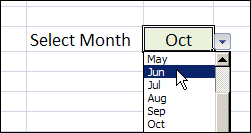
In the worksheet shown below, you can select a month from the drop down, and it overwrites any previous selection in that cell.
Select Multiple Items From the Drop Down List
Instead of limiting users to a single selection, you can use a bit of programming, combined with the data validation list, and allow multiple selections.
You can display all the selected items across a row, or down a column, or keep them in the same cell.
Keep reading, to see some examples of this technique, and how it works.
There is also a video that shows the multiple selection drop down list. To try it for yourself, follow the download link f
Watch the Data Validation Video
To see these techniques, and a few other multiple selection examples, you can watch this short video.
_________________
I am attempting to use the code from the “LineBreak” worksheet and I’ve copy and pasted it, but nothing happens. I have fairly long entries in my Data Validation list. I have named my list “InterventionChoices” and all cells in column 5 have this drop down list. I’m not sure how to change the code so I can add multiple selections from the drop down to the neighboring column with line breaks.
Hello Debra , my existing excel spreadsheet was in excel 2002 and lately my “office applicaion” was upgraded to version 2010. After which the “Select Multiple Items from Excel Data Validation List” does not work even though the code was intact. Your advise is much appreciated. Thank you.
I work on a Mac and therefore have Excel 2008 for Mac. I can’t seem to use your tip to cut and paste the code to allow for multiple selections in data validation because when I right click the tab in my worksheet, there is no ‘view code’ option. Is there another way to do this in Excel 2008? (Note, my knowledge of Excel is extremely limited.) Thanks.
@Lori, as far as I know, you can’t use programming in Excel 2008, so the multiple drop down code won’t run in that version.
@Lyle, in Excel 2010, you might need to change your security settings, then enable the macro when the file opens. There are instructions here:
http://www.contextures.com/excel-macro-record-test.html#ReadyTest
http://www.contextures.com/excel-macro-record-test.html#Test
Hi, is there any way in which I can lock the cell, I don’t want users to write anything, I want them to choose from the drop down list.