
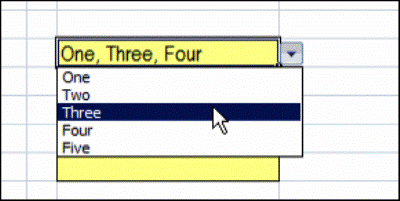
You’ve probably used an Excel data validation drop down list, where you can click the arrow, and select an item to fill the cell. With a bit of programming, you can customize a drop down list, to select multiple items.
Single Selection Drop Down
By default, data validation drop downs only allow you to select one item.
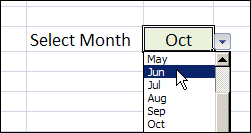
In the worksheet shown below, you can select a month from the drop down, and it overwrites any previous selection in that cell.
Select Multiple Items From the Drop Down List
Instead of limiting users to a single selection, you can use a bit of programming, combined with the data validation list, and allow multiple selections.
You can display all the selected items across a row, or down a column, or keep them in the same cell.
Keep reading, to see some examples of this technique, and how it works.
There is also a video that shows the multiple selection drop down list. To try it for yourself, follow the download link f
Watch the Data Validation Video
To see these techniques, and a few other multiple selection examples, you can watch this short video.
_________________
@Lisa, thanks for letting me know that you figured it out.
@Spencer, can you give an example or a bit more detail on what you’re trying to check?
@beth, it should work without problems in Excel 2007. Is there other code running in your file?
@Trevor, there’s nothing in this sample file that will stop duplicate selections. Something to consider for future version though — thanks for asking!
This has been so helpful; thank you for your valuable information!
I would like to echo Tom’s question:
“How would I modify the code to get a combination of samecell + line break.”
I too would like to have multiple selections show up in the selection cell and be seperated by a line break as opposed to a comma. Any suggestions?
I hope Debra doesn’t mind me answering but if you want a line break in the same cell, replace the line od code with the “,” on it with this:
Target.Value = oldVal _
& vbLf & newVal <<<——
That will give you a line break instead of a comma.
LB in GA
Debra,
Thanks!
What if i want to do data validation and run the same cell code for columns 6, 9, 12?
Troubled,
ELaine
Hi Debra and everyone,
One more question. What if i want to do same cell line break? How do i code that?
Thanks,
Elaine
Hello Debra! This is amazing, and almost exactly what I need. I am trying to target this code to one specific cell, and repeat it in multiple specific cells in a sheet. Can the code be changed from “column” to “cell” and put in parenthesis the comma separated list of specific cells? I’m not sure if that is even possible, but I wanted to ask.