
Excel is certainly packed with features, but I use a few free add-ins that make Excel even better.
[Update] I’ve created a list of all the free Excel add-ins that were suggested in the comments. Thanks for sharing your favourites!
Name Manager
by Jan Karel Pieterse of JKP Application Development Services
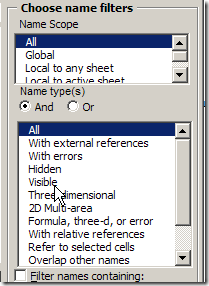
If you use names in Excel, you need this tool. You can quickly find names with errors and delete them, or track names that link to another workbook.
There are many more features, so download Name Manager, and see what it can help you with.
Excel Utilities
by Rob Bovey of AppsPro
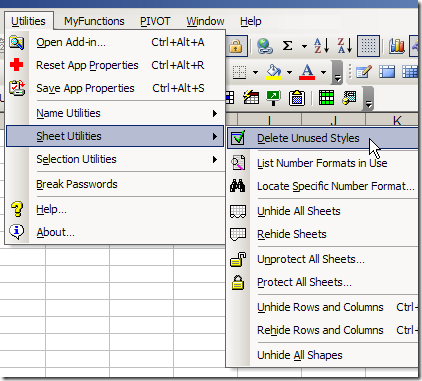
Rob’s add-in has handy tools for working with named ranges, worksheets and selections.
You can quickly protect and unprotect all the sheets in a workbook, remove unused styles, and my favourite – centre across a selection, without merging cells.
There are many more features, and you can read the full description on Rob’s page for Excel Utilities.
Pivot Power
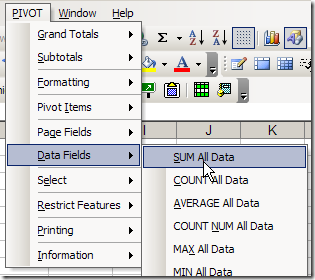
Since I work with pivot tables so often, I created my own pivot table add-in, that you can download.
The commands that I use most often are Clear Old Data, and Sum All Data.
Your Favourite Free Excel Add-Ins
What are your favourite free add-ins for Excel? Any of the ones that I’ve listed? Have you created some of your own?
_________________
From
http://peltiertech.com/WordPress/indispensable-excel-utilities/
The ones I use are:
Name Manager (of course, #1)
VBA Code Cleaner ( I use it all the time)
MZ Tools ( I use it daily)
FindLinks by Excel MVP Bill Manville
Plus:
AutoSafe
Chart Labeler
Steven Bullen’s Smart Indenter, VBE Tools
John Walkenbach’s J-Walk Chart Tools , Power Utility Pak (not free but almost)
ASAP Utilities
Inno Setup
FlexFind from Jan Karel Pieterse
Andy Pope’s Button Editor
JMT Utilities from http://www.andrewsexceltips.net/JMT%20Full%20List.htm
NB NOT from http://jmt.puremis.net/jmtutils which Google warns ‘may damage your computer’
What No ASAP Utilities…..Without Doubt the best Free General purpose set of excel utilities ever…
Thanks for the pointers! I definitely have to look up the name manager add-in. Excel 2007 was a big improvement on that front, but anyone who has had to maintain an Excel 2003 workbook with numerous and long names knows this is a nightmare.
It’s technically not an add-in, but I wrote a small free application, Akin, which opens 2 workbooks and helps track down where the differences are. You can check it out at http://www.clear-lines.com/akin.aspx. I would actually really welcome feedback!
Analysis Toolpak! #1.
Rob Bovey’s Code Cleaner.
Rob Bovey’s Chart Labeller (is there a common theme here?).
PopTools.
The only others I use are my own utilities, a DV Manager (similar to NameManager, just for DV), and a Form Manager (to facilitate form design without the designer).
Mathias, JKPs NameManger is streets ahead of the 2007 builtin Name Manager.
Dv manager and a Form Manager! I’m intrigued, worth a blog post Bob?!
Those with XL2003 or earlier versions might want a thesaurus.
(it works on the later versions too)
Download “Thesaurus for Excel” from…
http://excelusergroup.org/media/