
Have you switched from Excel 2003, with its compact toolbars, to Excel with its Ribbons commands?
If you’ve switched, did you find it easy to adjust to the new User Interface?
Classic Menu Add-in
I’ve heard lots of complaints about switching from those toolbars to the Excel Ribbon.
So, when I noticed an Excel add-in called, “Excel 2007 Ribbon to old Excel Classic Menu Toolbar” recently, I decided to download the trial version and take a look.
Transition to Excel Ribbon
Maybe this add-in would help people make an easier transition to Excel 2007. The add-in was at an introductory sale price of $8.99, so it wouldn’t be too big an investment.
The download went smoothly, and the installation took a bit longer than I expected, but nothing too serious.
Annoying Pop-up Window
However, immediately after the installation, a pop-up window appeared, asking me to send my name and email address, and subscribe to a newsletter.
I didn’t want the newsletter, and tried to close the window, but there’s no way to get rid of it.
The X button has no effect, and the Send button demands that you fill in the boxes.
Finally, I was able to close it with the Task Manager.
Uninstalling the Add-In
Because of that bad experience, I haven’t even tried the product and I’ve decided that I don’t want anything to do with this company.
I’ll be uninstalling the trial version in a couple of minutes.
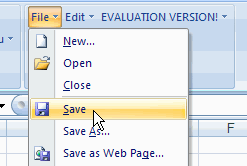
By the way, the trial version only installs two of the old style menus (File and Edit).
If you want the rest of the menus, you’ll have to buy the full version.
I won’t be buying it, but maybe it’s something you’d like to try.
Loved Those Tiny Toolbars
This Excel Toolbar add-in did make me realize one thing though.
It’s not the drop-down menus I miss, it’s the space-saving toolbars, with their tiny rows of efficient little buttons.
Another freeware excel menu-2003 from below site. Even if after loding addins you can delete the addins afterwards, it still works, you can use classic menu from addins tab.
http://shahshaileshs.web.officelive.com/Addins.aspx