
If you create a pivot chart in Excel, with dates along the axis, you might want to change the format of those dates.
Here are the steps for formatting Pivot Chart dates.
Format Axis Dialog Box Problem
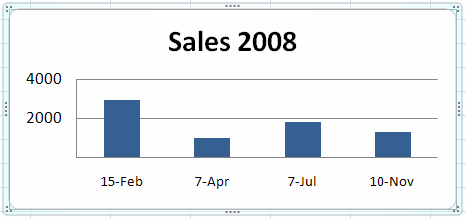
For example, if the date format is November 10, 2008, you may prefer something shorter, such as 10-Nov.
However, if you try to format the dates through the Format Axis dialog box, the change won’t be successful.
Pivot Field Format Settings
The pivot chart date formats are controlled by the field format in the pivot table. To change the date format:
- Right-click a date in the pivot table (not the pivot chart).
- Click on Field Settings
- Change the Number Format to the date format that you want.
This tip, and the answers to your other burning pivot table questions, can be found on the Pivot Table FAQ page on my web site.
Wanted dates to be formatted MMYY. The prior person had manually entered “Jan 14” ,etc. for each date. This was reading as text in the pivot table. Initially I copied dates that were written out as 01/01/2014 into the ajacent cell with formula =DATE(YEAR(A1),MONTH(A1),1). My goal was to show the date as Jan-2014. I then formatted the column to match this. The old pivot table was refreshed but the dates were showing as 01/01/2014. My solution: I removed the “Date” column from the Field list and then placed it back. Finally the number formatting option was avaible.
I as much having same problem and no solution has worked. My source is a data model, in 2013, connected to a view query from sql server.
No blanks…verified isnumber=true…and cannot change format in table or chart.
No “number” button shows up as long as Date field is a Row…but does show “number” format button when Date field is a Value …..
Thanks for any help on this!!!
It’s true, once you change the range to the exact data range, the button comes up. It’s silly to have such retriction, because if the source changes all the time, like increasing every day, you are forced to increase the pivot data range manually every day as well, in order to show the new content.
Thanx my problem is Solved.Problem Was Date Formating in Piovt Chart.
This worked for my instance. You are my hero.
@cincrin, Thanks, I’m glad it helped you!