
There’s a sample Excel workbook on my Contextures website that uses a bit of Excel VBA to automatically add new items to an Excel data validation drop down list.
Add New Item to List
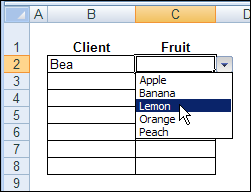
For example, if the drop down list shows Apple, Banana and Peach, you can type Lemon in the data validation cell.
Then, as soon as you press the Enter key, Lemon is added to the named range that the data validation list is based on.
The source list is sorted too, so that Lemon appears between Banana and Peach.
Read the Instructions
Someone emailed me last week, and asked if I would explain how the Excel VBA code works.
It rained (and even snowed a little) on Friday, so it was a good day to stay in, and work on a new page for the website.
If you’re interested in setting up a similar file, you can wander over to my Contextures website, and read Excel Data Validation – Add New Items.
Watch the Video
Here’s a short video that demonstrates the file, and briefly explains how the code works.
You can watch this, if it’s too early in the day to read about Excel VBA code.
Download the Sample File
If you’d rather just play with the file, and figure it our for yourself, you can download the workbook from my Contextures website.
Go to the sample workbooks page, and in the data validation section, look for DV0021 – Update Multiple Validation Lists
It’s in Excel 2003 format, and contains macros. You can enable macros if you want to test the code.
___________
Try as I may, I cannot get this to work. I tried first to use it in an existing workbook–no go. So I created a new workbook that I believe is a perfect clone of your sample. The drop down lists operate but any attempt to add a new item to either list fails in error. Any ideas?? Thanks for your wonderful site–can’t tell you how much I’ve learned.
I am using this code and works fine. But its not validating the invalid data. If user types a value not in a drop down it accept. It may due the COUNTA function.Can you suggest to show error message when user types invalid data