
I use Excel tables in almost every file that I build, these days. They come with a default filter, and it’s easy to sort and filter the table’s data with those drop down lists, and clear them later. But did you know that you can clear Excel filters with a single click?
Clear the Filters
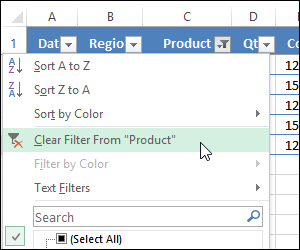
After you apply filters on Excel table columns, you’ll probably want to see all the data again. To do that, it’s easy to clear one filter at a time, using the Clear Filter command on the drop down list in the column heading.
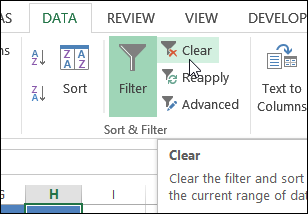
Or go to the Data tab, and click the Clear button, to clear all the filters in the active table.
Make It Easier
If you don’t have time for extra clicks, when you’re clearing filters all day long, here is a quick way to clear them. Thanks to AlexJ, who shared this tip.
You can find more of AlexJ’s Excel sample files on my Contextures site.
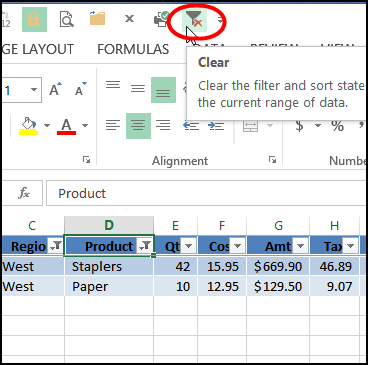
To make this a one-click process:
- Add a Clear button to the Quick Access Toolbar (QAT).
- Select a cell in a pivot table, or an Excel table
- Click the Clear button, and all the filters are cleared.
It Works on Pivot Tables Too
To make this “Clear All Filters” tip even more useful, it works on pivot tables too!
If you use the Ribbon commands to clear a pivot table’s filters, it takes several clicks, because the Clear command is down a few layers.
- First, go to the Analyze tab under PivotTable Tools
- Then click Actions
- Then click Clear Filters.
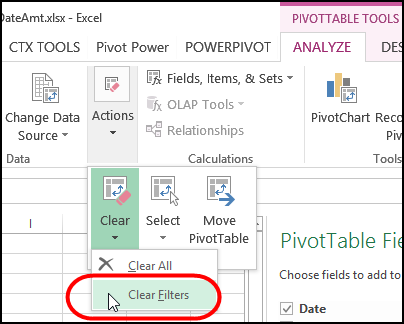
But, if you add the Clear button to the QAT, you can use it to clear the active pivot table too. Think of all the time that will save you!
Video: Quickly Clear Pivot Table Filters
Watch this short video to see the steps for setting up the button, and clearing the filters.
______________________
When we are working on Excel sheet. chosen filter option in same sheet for three columns ,if we want to remove one filter among three without disturbing other. please advice short cut.
Regards,
Tanoj
Thank you. I’m working a lot with filters and I go to filters 2 3 steps deep. It was a pain in fingers to clear each filter with the mouse click. Now with the macro, I can clear them all with keystroke.