
If you’re working on a project, you might need to keep track of time in Excel, so you can tell a client how much time you’ve spent on their project, and get paid for your work. Or, use the time data to see how much of your day is spent on productive tasks, and how much is spent Googling and tweeting.
Enter the Current Time
To calculate the time spent on a task, you’ll need to have a start time and an end time.
To quickly enter the current time in Excel, use the keyboard shortcut: Ctrl + Shift + ;
- When you start a task, use the shortcut to enter the start time in one cell.
- When you finish working on a task, use the shortcut in an adjacent cell, to enter the end time.
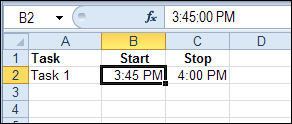
In the screen shot below, the Task start times are entered in column B and the end times are entered in column C.
Calculate the Elapsed Time
Based on the start and end times, you can calculat the elapsed time, by subtracting the start time from the end time.
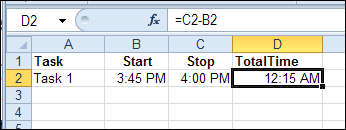
In this example, I’ll calculate the time in cell D2, using this formula:
=C2-B2
Format the Elapsed Time
There is a 15 minute difference in the start and end times in this example, but the result cell is showing a time – 12:15 AM
To see the result as hours and minutes of elapsed time, change the formatting:
- Select cell D2, where the elapsed time is calculated
- Press Ctrl + 1 to open the Format Cells dialog box
- On the Number tab, click the Time category
- Click on the 37:30:55 format, then click OK
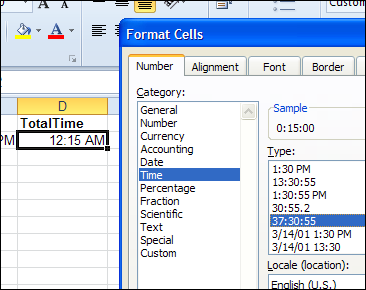
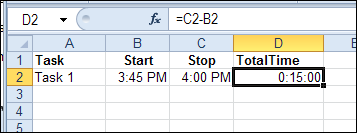
This format displays an overall total of hours, minutes and seconds. Cell D2 now shows the elapsed time of 15 minutes.
Formula Error When No End Time
The formula works well if a start time and an end time have been entered. But there is a problem if only the start time has been entered.
The result in cell D3 is a negative number, because the start time is subtracted from zero (the value of empty cell C3).
Excel displays negative dates and times as #####.
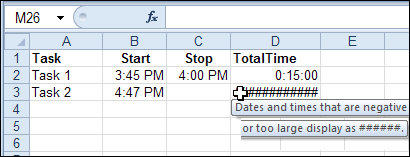
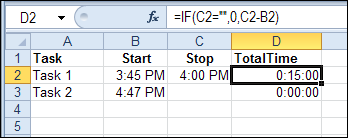
To avoid this problem, add an IF function to the formula in cell D2, and copy it down to cell D3:
=IF(C2=””,0,C2-B2)
Now, the formula checks cell C2, and if it is empty, the formula result is zero.
Formula Error After Midnight
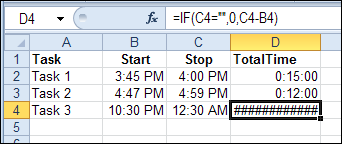
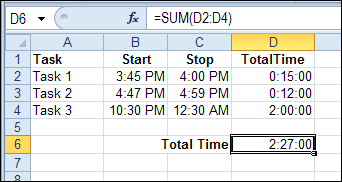
If you’re burning the midnight oil on client projects, you’ll run into another error. In the screen shot below, the start time for Task 3 is 10:30 PM, and I worked past midnight – ending at 12:30 AM.
The formula result is a negative number, because the end time is smaller than the start time.
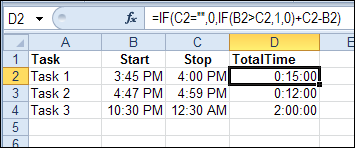
To fix this problem, change the formula one more time. If the start time is greater than the end time, assume that the task ended the next day.
In that case, add 1 to the end time, which is the equivalent of adding a full day to the end time. That makes the end time greater than the start time, and the calculation will work correctly.
=IF(C2=””,0,IF(B2>C2,1,0)+C2-B2)
Add the Task Times
To get the total time for all your tasks, use the SUM function. It should automatically format the total cell in the 37:30:55 format, but if not, you can format the cell manually.
=SUM(D2:D4)
________________
I’m actually working on a time card in Excel right now. It’s pretty close to being finished. If you’re interested I can post when it is completed. I’ll be offering it up for free, it’s helping me to learn how to do different things in Excel with VB.NET. It’s been fun so far! It should come out pretty nice.
Hi Jon,
I’m about to start working on a time sheet, and was seeing if I could take a look at your project. Thanks!
William. Please can you assist me with that time card you built. [email protected]
Tha k you
Hi Jon,
You posted you would offer your time sheet project. I am doing something similar where I work and would love to see how you did yours. I haven’t gotten into the VB part of Excel and would like to see some completed projects to back my way in. I like to see the end results and then decipher how it was accomplished. If you could email me, it would be greatly appreciated.
Thanks,
Debby
Dear Debby,
Is there a freely available excel file for start-stop based task time tracking from this work by you and the others replied in here? Thanks for great work!
Bests,
Sami
Can I have it as well?
When I am tracking time for a project and I take a break to, for example, have lunch, how do I start/stop time?
hi Jon
I know its been some time since you offered your time sheet. Is it still available?
Could you please send me this time sheet. I have been working on one and it is not giving me the outcome wanted.
Negative time is not possible in Excel (other than by formatting, or number to text).
This makes it especially difficult to make a bellshaped barcart chart around zero time deviation —-0++++ – from a pivottable.
I tried both formulas =IF(A10>=0;””;”-“)&TEXT(ABS(A10);”tt:mm”), and formatting [>=1]D\d tt:mm;[<0]-0,00;tt:mm but Excel 2010 Chart has an error so it doesn't work.
Any other options?
EXCELENT SUPPORT FOR EXCEL FROM THIS SITE….THANKS
Its good indeed, but any one can change the timings as per their wish.
I mean to say if we working on sharing work book, so I can make changes in others time.
so is there any way to track the time with out further corrections by any one.
Need advise.
I love the “after midnight” solution…have been trying to work this out for some time. But the formatting will not enable me to take the sum total and multiply it by a payrate (as in a timesheet application). Any help?
@Karen, multiply the total time cell by the pay rate, multiplied by 24
For example: =D6*F2*24
Then, format that cell as currency or a number with two decimal places
Beautiful! Thanks, Debra!