
There is a new sample file on the Contextures website, with a macro to change all pivot tables with one selection, when you change a report filter in one pivot table.
Change All Pivot Tables
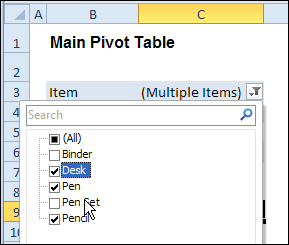
In the sample workbook, if you change the “Item” Report Filter in one pivot table, all the other pivot tables with an “Item” filter will change.
They get the same report filter settings that were in the pivot table that you changed.
Select Multiple Items
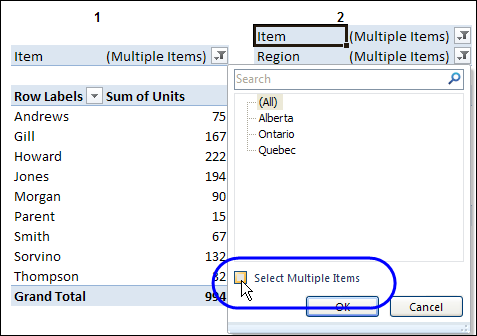
In this version of the sample file, the “Select Multiple Items” setting is also changed, to match the setting that is in the pivot table that you changed.
In the screen shot below, the Item field has the “Select Multiple Items” setting turned off. If any other pivot tables in the workbook have an “Items” filter, the “Select Multiple Items” setting for those fields will also change.
How It Works
The multiple pivot table filtering works with event programming. There is Worksheet_PivotTableUpdate code on each worksheet, and it runs when any pivot table on that worksheet is changed or refreshed.
For each report filter field, the code checks for the Select Multiple Items setting, to change all Pivot Tables with the same report filter field.
The code loops through all the worksheets in the workbook, and loops through each pivot table on each sheet.
Private Sub Worksheet_PivotTableUpdate _
  (ByVal Target As PivotTable)
Dim wsMain As Worksheet
Dim ws As Worksheet
Dim ptMain As PivotTable
Dim pt As PivotTable
Dim pfMain As PivotField
Dim pf As PivotField
Dim pi As PivotItem
Dim bMI As Boolean
On Error Resume Next
Set wsMain = ActiveSheet
Set ptMain = Target
Application.EnableEvents = False
Application.ScreenUpdating = False
For Each pfMain In ptMain.PageFields
  bMI = pfMain.EnableMultiplePageItems
  For Each ws In ThisWorkbook.Worksheets
    For Each pt In ws.PivotTables
      If ws.Name & "_" & pt <> _
          wsMain.Name & "_" & ptMain Then
        pt.ManualUpdate = True
        Set pf = pt.PivotFields(pfMain.Name)
          bMI = pfMain.EnableMultiplePageItems
          With pf
            .ClearAllFilters
            Select Case bMI
              Case False
                .CurrentPage _
                  = pfMain.CurrentPage.Value
              Case True
                .CurrentPage = "(All)"
                For Each pi In pfMain.PivotItems
                  .PivotItems(pi.Name).Visible _
                    = pi.Visible
                Next pi
                .EnableMultiplePageItems = bMI
            End Select
          End With
          bMI = False
        Set pf = Nothing
        pt.ManualUpdate = False
      End If
    Next pt
  Next ws
Next pfMain
Application.EnableEvents = True
Application.ScreenUpdating = True
End Sub
Download the Sample File
To test the Change All Pivot Tables code, you can download the sample file from the Contextures website.
On the Sample Excel Files page, in the Pivot Tables section, look for PT0025 – Change All Page Fields with Multiple Selection Settings.
The file will work in Excel 2007 or later, if you enable macros.
Watch the Video
To see the steps for copying the code into your worksheet, and an explanation of how the code works, watch this short video.
______________________
Hi
I have 5 different sets of data on 5 different sheets which have two key fields that are common across all data sets in all the sheets
I used pivot tables in all the sheets and filter on the common field in each sheet. The data is the used to generate graphs and the scales for the graphs are calculated using Private Sub Worksheet_Calculate().
Earlier I used to filter each pivot table manually in each sheet. But with your code I am able to select an item in the pivot table in the active sheet and thee same item gets selected in the pivot table in all other sheets as well.
However, the graphs which are generated from the pivoted data get calibrated with the Private Sub Worksheet_Calculate() only in the active sheet. Only upon refreshing the pivot table data in any of the sheets do the graphs in the other sheets get re-calibrated.
What should be done so that I do not have to refresh the pivot table one more time?
I have tried ActiveWorkbook.RefreshAll which takes too long….
Pls suggest some solution.
Thanks
Hi, first thank you for such a beautiful code. Works like charm.
One issue I am facing. I have taken a Slicer based on the one of the Pivots. So, when I use the slicer, after everything gets updated, the sheets report filter gets selected by default.
I have tried putting the code to activate the 1st cell of the sheet but still the report filter cell gets selected. How to work around this?
Hi Debra,
this is so sinsightful,
is there any chance to use more than one slicer not only market but also other variables to be applied with your code?
regards,
Fariz