
Last year, I showed that you could combine text in Excel by using the ampersand (&) operator, instead of the CONCATENATE function. That makes it much easier for those of us who are lazy, or can’t remember how to spell concatenate.
There was a combine text video too, and I’ve it added to the bottom of this post, so you can see it again. It’s more interesting than most of the new programs that are starting on television this season!
Formula is Showing
After watching that video on YouTube, someone asked why his worksheet was showing those combine text formulas, instead of the results.
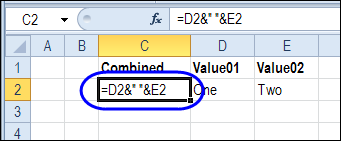
There are two likely causes for this, described below. And the good news is that it’s easy to fix both!
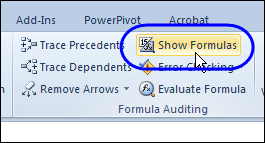
Show Formulas
Excel has a feature that lets you switch between seeing the formulas, and formula results, by using the keyboard shortcut:
Ctrl + `
That ` character is the grave accent, and it’s at the top left on my keyboard, just above the Tab key .
Or, use the Ribbon command to make the switch – on the Formula tab, click Show Formulas
Cell Formatting
If the problem isn’t fixed by clicking the Show Formulas button, then the cell formatting is causing the problem.
To fix the formatting:
- Select the cells where formulas are showing
- On the Excel Ribbon, click the Home tab
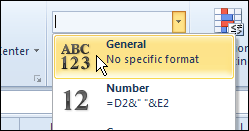
- In the Number group, change the cell format from Text, to General
With the cells still selected,
- Click the Home tab on the Ribbon
- Click Find & Select, and click Replace
- In the Find What box, type an equal sign: =
- In the Replace With box, type an equal sign: =
- Click Replace All, then click OK, and close the dialog box.
Combine Text Without Concatenate Video
Here’s the short video that shows how to combine the values from two cells into a single cell.
- The first example joins first and last names
- The second example joins text with a formatted number.
_________________
The key combination is actually Ctrl+’ (gravé accent). You would need to hold the Shift key for Ctrl+~ and that doesn’t do anything in Excel.
Thanks JP! It’s fixed now.
There are occasions that I am so focussed on the formula, I forget the equal sign. The formula shows up as text.
Thanks Lee! That’s happened to me a few times too. Usually I notice the problem when I try to link to another cell, and that doesn’t work without the equal sign at the start.
Debra – On my computer, after changing the formatting to General, I also have to edit the cell (double-click the cell, click the formula bar, or press F2) in order for the formula to work. I’ve tested this a number of ways, but if you find I’ve still missed something please feel free to not post this comment.
Bob, you’re right, thanks! If it’s just a couple of cells, you can double-click the cell, then press Enter, to calculate it.
If there are more than a few cells, select them, and use the Replace command to replace all the equal signs:
Replace: =
With: =
Click Replace All