
I’ve done another update to the Data Validation Multiple Selection sample, thanks to a question from Pat, in a blog comment. He has 3 columns with different drop down lists, and wants to add new items to the applicable lists.
I can get 3 separate columns to each allow multiple selects from their own lists and to allow write in contents…But what I want …is to make the selected columns (not all) so that write in selections are written to the lists and the lists are sorted.
So, in the new example, on the SameCellAddSort worksheet in the sample workbook, that’s what happens. You can do a multiple select in columns C and D, but only a single selection in column B.
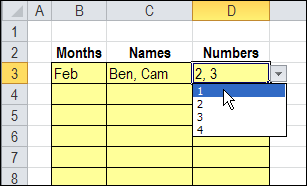
Add New Items
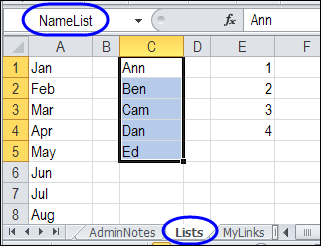
New items can be added to the Names and Numbers columns. If a new name is entered in column C, is will be added to the NameList range on the Lists sheet. Then, the list is sorted alphabetically.
Download the Sample File
To see the code, you can go to the Excel Data Validation – Select Multiple Items page on my Contextures site. The file contains macros, so enable them when opening the workbook.
Watch the Multiple Selection Add Sort Video
To see how the multiple selection add and sort technique works, and see an explanation of the code, you can watch this Excel video tutorial.
More Information on Data Validation Multiple Selection
Most of the examples in the DataValMultiSelect file have limits set in the code. For example, the code might check the column number, and only allow the multiple selections if the column number is 3.
If you remove those checks from the code, and just check for data validation in the selected cell, you could have several multi-selection lists on the same worksheet. There is an explanation on my Contextures website, for adjusting the code:
Here are a few more article on the data validation multiple selection technique:
- How to Set up Multiple Selection Excel Drop Down
- Edit Multiple Selections in Excel Drop Down Lists
- Select Multiple Items from Excel Data Validation List
_______________
Hello,
First of all thanks for the sample.
Code doesen’t work if i want to protect sheets.
What shoud i do?
@Michael, I’ve added a new code sample that will work on protected sheets
http://www.contextures.com/excel-data-validation-multiple.html#protect