
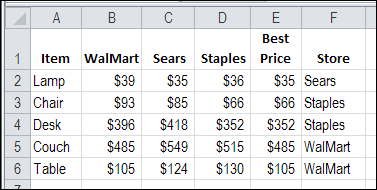
If you’re setting up a new office, or going grocery shopping, you can use Excel to compare prices. Find best price with Excel INDEX and MATCH functions, combined with MIN. This will help you calculate the lowest price for each item, and see which store sells at that price. Then, print a list, and go shopping!
Calculate Best Price with MIN
In this example, we have done some research, and entered the item prices from three stores, in cells B2:D6.
The next step is to calculate the best price for each item, by using the Excel MIN function. The formula in cell E2 is:
=MIN(B2:D2)
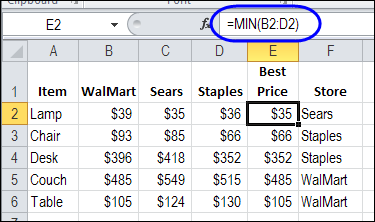
Then, copy the formula down to cell E6.
Find Store With Lowest Price MATCH
The final step, before printing your shopping list, is to determine which store has that best price. For this, you’ll use the INDEX and MATCH functions.
With the MATCH function, you can find the position of the lowest price, in the 3 columns with store prices. This MATCH formula looks in cells B2:D2, to find the best price from cell E2.
=MATCH(E2,B2:D2,0)
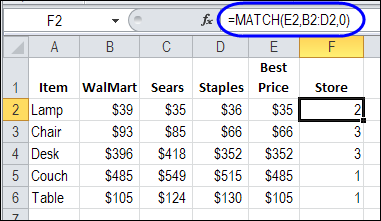
Sears has the lowest price for a lamp, and it is the second store in our worksheet, so the MATCH result is 2.
Get the Store Name With INDEX
Our shopping trip will be easier if there is a store name in column F, Instead of a store position number. The store names are listed in cells B1:D1, and the INDEX function can return a value from a specific position in a range.
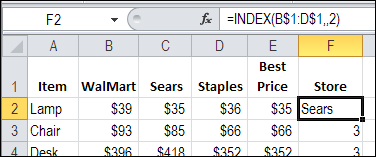
With the INDEX function, we could select cells B$1:D$1, and type a 2 as the column number that should be returned.
=INDEX(B$1:D$1,,2)
The reference to B$1:D$1 uses dollar signs before the row number, because we don’t want that reference to shift, as we copy the formula down, in column F.
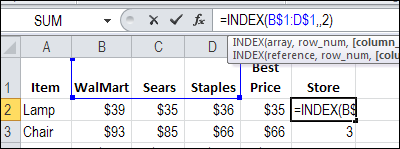
The result in cell F2 is Sears.
Combine INDEX and MATCH
Instead of typing the column number in the INDEX formula, we can use our MATCH formula to calculate the column number.
Here is the combined INDEX and MATCH formula, in cell F2:
=INDEX(B$1:D$1,,MATCH(E2,B2:D2,0))
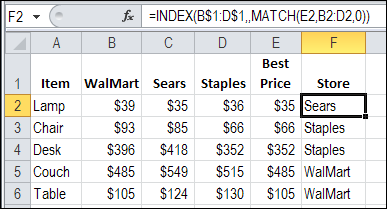
Copy the formula down to F6, and you’re ready to hit the shopping centre!
Download the Sample Excel File
To see the formulas, and the sample data, you can download the Best Price with Excel INDEX and MATCH sample workbook. It is in Excel 2007 format, and zipped. There are no macros in the file.
Watch the Best Price with Excel INDEX and MATCH Video
To see the steps for finding the store with the lowest price, watch this Excel video tutorial.
_____________
how can I do the match & index on excel with prices and store in different sheets
Thank you!!! You just saved me HOURS worth of work!!
Hi, is there a way to Find Best Price & 2nd Best Price With Excel INDEX and MATCH?
Would really appreciate it. Looking forward to your reply. Thanks
Once again great tutoria
I have used this method on a large database and this works great
Some companies have the same price however and in that case I would like both companies to appear.
Is it possible in any way?
Please help me to get Rate for following
Question
Supplier Name Item Date Rate
Super Vegetables Tomato 02-Jan-23 ?
Super Vegetables Tomato 06-Jan-23 ?
from
Super Vegetables Tomato 01-Jan-23 9
Super Vegetables Tomato 05-Jan-23 9.25
Super Vegetables Tomato 08-Jan-23 8
on 1st Question Answer should be 9
& in Second it should be 9.25