
[Latest update: July 27, 2016] With a bit of Excel VBA programming, you can change an Excel data validation drop down list, so it allows multiple selections. This post is a roundup of articles on how to set up multiple selection Excel drop down lists.
Multiple Selection Drop Downs
You can find a sample file and instructions, in a blog post that I wrote a couple of years ago – Select Multiple Items from Excel Data Validation List.
There is a video in that post, that shows how the multiple selection options work, and a peek at the code that makes the multiple selections possible.
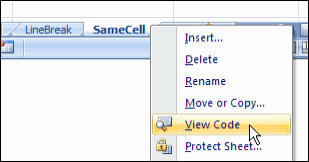
Setting up the Workbook
Even though the post is a couple of years old, it still gets comments and questions. This week, Rick asked for details on setting up a new workbook, and copying the sample code into the new file.
To help, I’ve recorded another video, showing the setup steps.
More Articles on Select Multiple Items
[Update]: Since posting this article on selecting multiple items from an Excel drop down list, I’ve added more articles on the same topic. Please read these updates, for more details on working with the VBA code:
- edit multiple selection cells
- prevent duplicates in multiple selection column
Changing the Macro Code
If you need to change the column numbers in the code, there are instructions here.
To run the code on a protected worksheet, see the notes here.
Download the Sample Data Validation File
To experiment with this technique, you can download the zipped sample file from the Contextures website, on the Excel Data Validation – Select Multiple Items page.
_____________
This is great for logging the information needed on a daily basis. Thank you for that.
Is there any way to get this to work on a protected worksheet?
I have several formulas as well and want them protected but when I protect the worksheet, the multi selection stops working.
Thanks in advance.
You’ve just saved my life, thank you for your support.
This worked great however if an error was made in the selection my team can delete or edit to change. Anyone have an answer for this
I can’t get the sample coding you have provided working in excel 7 or 10 but it works great in 03. Is there something I need to do to get this to work??
HI I alos need it to work for mulitple columns but niether of the ideas further up in the thread had worked for me. ANy other ideas?
@Leigh, there are more examples of how to change/add column numbers on my website:
http://www.contextures.com/excel-data-validation-multiple.html#column