
I’ve been working with Excel for approximately 125 years, and never realized that there was a hidden number in the worksheet error messages.
Excel Error Message
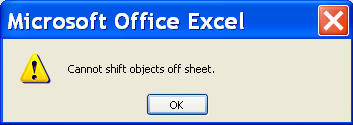
For example, if you try to insert a column in Excel, you might see this message that warns “Cannot shift objects off sheet“.
See Error Message Number
To see the specific error number for that message, you can press the following keyboard shortcut:
- Ctrl + Shift + I
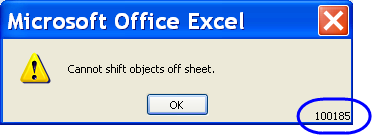
The error message number appears in the bottom right corner of the error message. I’ve circled the number in the screen shot below.
Use the Error Number
That error message number could be useful if you’re doing a Google search, to find a solution to a specific problem.
Or, that number could be useful if you’re searching in the Microsoft Knowledgebase, or anywhere on the Microsoft website, for specific help.
Did you know those error numbers were hidden in the messages?
_________________
I have been using excel for 124 years and am certain that I would not have discovered it for another 125…. How on the earth did you know this….
@Sam,
While apparently not widely known, this feature has not been a secret. A Google search using…
excel “error message” “ctrl+shift+i”
showed several hits. A quick look at some of them revealed an online posting from nearly 4 years ago (5/3/2007) that mentioned it…
http://msgroups.net/microsoft.public.access/Error-opening-MS-Access-2007-Problem-communicating-with-OLE-serve
Talk about hiding information from the user!
@Rick: Problem is if you know enough to Google something as obscure as those search terms, then you probably don’t need to Google it 😉
Great tip
Hi Deb
Going by age difference, I must have been using it for about 160 years!!!
Never heard of it, well done for finding it and posting.
How many other “goodies” are hidden away from us I wonder?
Speaking about not knowing things, it was only whilst talking to some of the guys whilst in Seattle, I realised that under Windows 7 if you use the Windows key + left arrow, it will size your currently active Window to half of the screen on the left, similarly with the Windows right arrow key to place another window to the right.
I don’t use it a great deal, as I am normally on 3 monitors, but when working on a single screen that is really neat.
Hello
It’s been a long long time too i’ve been practising excel without knowing that tip.
I usually query Google or else with the whole error textlines.