
Apparently there is a big football game this weekend in the USA. They’re using Excel for the game — XLV. That’s a really old version, but at least it has multiple sheets and VBA!
ROMAN Function
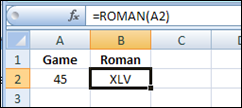
The officials probably used the Excel ROMAN function to figure out how to show the game number — 45:
=ROMAN(A2)
While you’re watching the game, you can use an Excel function to convert the field size from yards to metres. You’ll see that the American field is smaller than the Canadian field, no matter what measurement system you use!
Convert Metres to Yards
There is a CONVERT function in Excel, that you can use to convert measurements from one system to another.
=CONVERT(number,from_unit,to_unit)
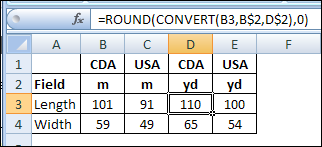
For example, cell B3 has the length of a Canadian field in metres. In cell D3, the following formula converts that measurement to yards, and rounds the result:
=ROUND(CONVERT(B3,B$2,D$2),0)
Unfortunately, the CONVERT function does not get you an extra point.
Other Differences
Besides the size of the fields, there are other key differences between Canadian and American football.
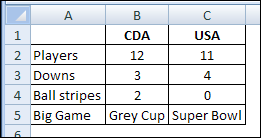
No stripes? Fewer players? More downs? You call that a game? 😉


Speaking of Excel 5.0
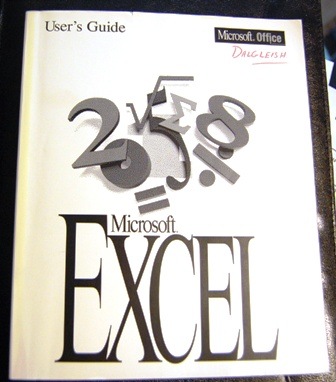
Do you remember when printed manuals came with the software? I still have my Excel 5.0 User Guide, so maybe I can read it while watching the big game!
There were tons of new features in that version, so there will be lots of interesting stuff to read.
________________
Maybe I mixed things up a bit and it is actually 4.2 with 25 disks, I can’t recall.
I didn’t even realize Excel had a ROMAN function. That’s awesome.
The sad magpie that I am, I have the Excel 4 Function Reference Book…..ah the joys of a macro sheet instead of that new fangled VBA…..