
Happy Canadian Thanksgiving! You probably have your own spreadsheet to organize the meal, but you can download my Excel Holiday Dinner Planner, if you don’t have one of your own.
Drop Down Lists in Dinner Planner
The dinner planner has data validation cells, where you can select a start time, or type of food, or cooking location, from a drop down list.
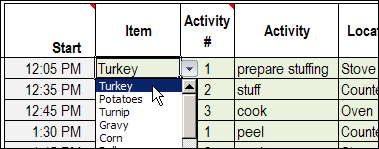
Data Validation Drop Down
Doug Glancy sent me a sample data validation file that he created, that uses a variation on dependent data validation.
I changed his file a bit, to “Thanksgiving” it up. The file has a list of Thanksgiving dinner guests, whether they’d like turkey, and if so, the number of slices.
In column B there’s a simple data validation drop down list, where you can select TRUE or FALSE.
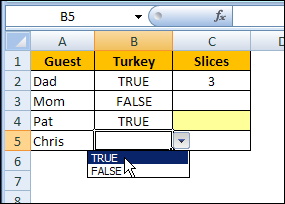
Conditional Data Validation
In column C, there is a conditional data validation drop down list, based on the selection in column B.
- If TRUE was selected, there is a drop down list with numbers (NumList)
- If FALSE was selected, there is no drop down list.
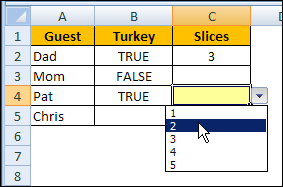
Conditional Data Validation
To create the conditional data validation, Doug created a named formula — Test. With cell C2 selected, the Test formula is:
- =IF(TurkeyOption!$B2=TRUE,NumList)
In column C, the data validation is a list, with the source =Test
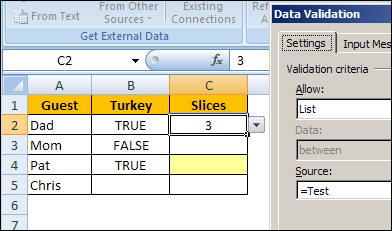
Conditional Formatting
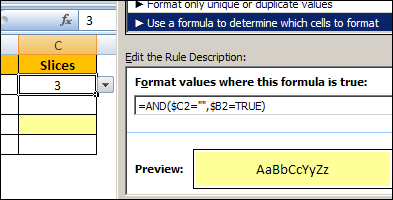
To highlight the cells where a number of slices should be entered, Doug added conditional formatting in column C.
The cell will turn yellow if TRUE was selected in column B, and the number of slices hasn’t been entered.
=AND($C2=””,$B2=TRUE)
Download the Sample File
Thanks, Doug, for sending your sample file. You can download Doug’s Excel Conditional Data Validation sample file, to see how it’s set up.
The file is zipped, and in Excel 2003 format, with no macros.
_____________
I have a data dump with lets say 4 fields A, and B.
I would like to create a Data validation list from values in Column B based on the value of Column A.
eg:
A B
Obsolete SW1
Active SW2
Obsolete SW3
Active SW4
Active SW5
My Validation list must be:
SW2
SW4
SW5