
A nice new feature in Excel 2010 is the ability to refer to a different worksheet when creating conditional formatting and data validation. Let’s take a look at how the conditional formatting from different sheet feature works, and create a workaround for older Excel versions.
Compare Cells on Two Sheets
In this example, you’d like to highlight the cells on Sheet1, if they’re higher than the matching cell on Sheet2.
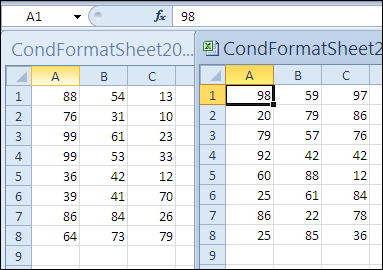
To highlight the cells in Excel 2010:
- Select cells A1:C8 on Sheet1, with A1 as the active cell
- On the Ribbon, click the Home tab, and click Conditional Formatting
- Click Highlight Cell Rules, then click Greater Than
- In the Greater Than dialog box, click in the cell reference box
- Click on the tab for Sheet2
- Select cell A1 on Sheet2, and click OK
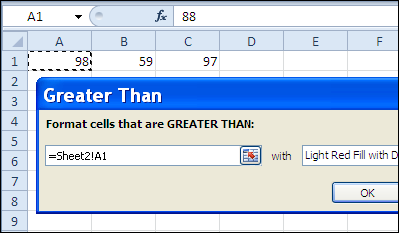
The cells on Sheet1 are now highlighted if their value is higher than the matching cell on Sheet2.
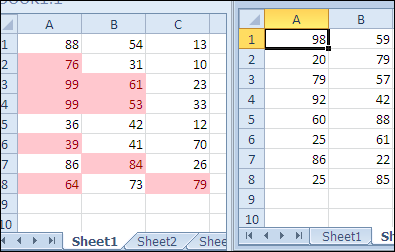
Conditional Formatting Workaround for Earlier Versions
In earlier versions of Excel, you can’t refer to another sheet in conditional formatting or data validation. With data validation, you can’t even click on the other sheet, to try and create a reference.
In conditional formatting, you can enter the reference in the dialog box, but then Excel yells at you.
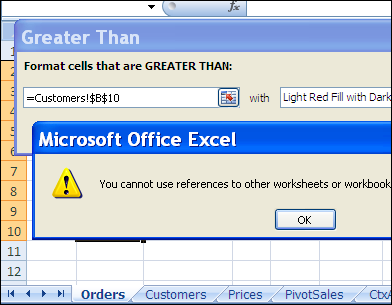
However, you can refer to named ranges anywhere in the workbook, in both conditional formatting and data validation, so you can use that as a workaround.
To highlight the cells in Excel 2007 and earlier versions:
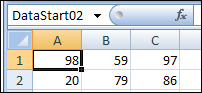
- On Sheet2, name cell A1 as DataStart02
- Select cells A1:C8 on Sheet1, with A1 as the active cell
- On the Ribbon, click the Home tab, and click Conditional Formatting
- Click Highlight Cell Rules, then click Greater Than
- In the Greater Than dialog box, click in the cell reference box
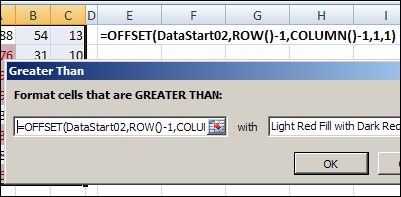
- Type an OFFSET formula that refers to the named range on Sheet2. This will refer to the cell on Sheet2 that is in the same row and column as the active cell.
=OFFSET(DataStart02,ROW()-1,COLUMN()-1,1,1)
- Click OK
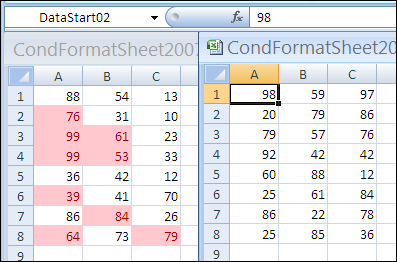
The cells on Sheet1 are now highlighted if their value is higher than the matching cell on Sheet2.
______________
I have a following condition:
If A1 = “ZERO” then colour of B1 should become orange if the value of B1>0 or B1 should become yellow if B1=0.
I tried thin in XL2013 & got an error message saying “You may not use references to other workbooks for Conditional Formatting criteria.” I assume it’s b/c this application of the feature has been removed from versions of Excel subsequent to 2010.
Mike, this example is using a reference to another sheet in the SAME workbook.
You’re not allowed to refer to cells in a different workbook.
This worked fine for me but I’m looking to take it a step further. Is there a way I can compare the cell from one sheet to multiple cells within a range on another? This is so that for example:
Sheet1B1 > Sheet2B1 and Sheet1B1 > Sheet2B2 and so on and so forth, highlighting Sheet1B1 if it is greater than the value of any cell within the designated range of the Sheet2
Thanks!
Hi, I was wondering I you could help me. I have a workbook and one one sheet I have a column that will have slot Id’s and when I click on that cell I want the value (slot ID) to highlight on my layout sheet that will show me the location of that item in my warehouse layout. I am not sure what I should do or use. Basically I want to click on the cell with the slot ID and have it highlight on another sheet where that slot ID is located. Each cell on that column will be a different slot ID and I want to be able to click on any cell and have the location highlight on my layouts page.
Can you help?
Thank you,
Kris
i need to Create Notifications using Conditional Formatting in Microsoft Excel and i need to show the different sheet Notifications in one sheet