
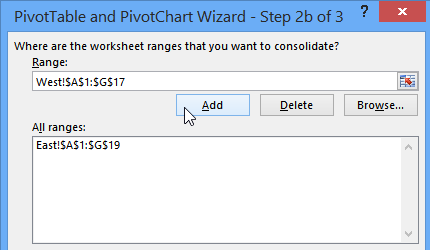
If Excel data is on different sheets, you can create a pivot table from multiple sheets, by using multiple consolidation ranges. My video, further down this page, shows you the steps.
Of course, it’s better if the data is all on one sheet. But, if you don’t have that option, the multiple consolidation ranges will pull all the data into one pivot table.
How to Get Started
Long ago, in Excel 2003, you could open the PivotTable and PivotChart wizard by going to the Data menu. Then, you could click the PivotTable and PivotChart Report command.
Unfortunately, there’s no equivalent command on the Ribbon in later versions of Excel.
However, you can press the keyboard shortcut:
- Alt+D, then type P
That will open the PivotTable and PivotChart wizard.
Pivot Table Limitations
The pivot table from multiple sheets isn’t as flexible as a regular pivot table:
- All the data fields use the same summary function
- There’s only one row field
- The first column in the data is used as the row field
However, while you’re setting up the pivot table you can create one or more page fields, and create labels for the data ranges.
Read the Instructions
There are written instructions, and details on the pivot table limitations, on my Contextures website:
Excel Pivot Table From Multiple Consolidation Ranges
Watch the Video
The short video below shows you the steps to create the pivot table from multiple sheets, and set up a page field for each set of data.
Video Timeline
- 0:00 Data on 2 Sheets
- 0:24 Open PivotTable Wizard
- 0:50 Select Sheet Ranges
- 1:08 Page Field Settings
- 1:29 Adjust the Pivot Table
- 2:04 Show Sum
- 2:15 Page Field
____________
Excel Pivot Table from Multiple Sheets
This was the best tutorial I ‘ve had on this subject!