
While working on a client’s sales plan last week, I had to count the orders for a couple of specific customers. This tutorial shows how to count cells with specific text in Excel.
Customer Data Sample
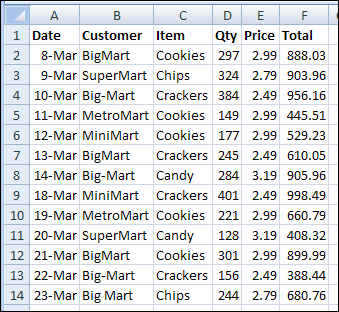
Here’s a screenshot of some sample data, with the customer names in column B.
Count cells that are an exact match
In Excel, you can use the COUNTIF function to count cells that meet a specific criterion. For example, you can use this formula to count the orders that were placed by the customer, BigMart.
=COUNTIF($B$2:$B$14,”BigMart”)
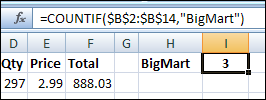
- The first argument, $B$2:$B$14, is the range that contains the cells to be counted.
- The second argument, “BigMart”, is the value that we want to count.
There are 3 cells that contain the exact text, “BigMart”, so the COUNTIF formula returns 3.
Use a cell reference in COUNTIF
Instead of typing the text in the COUNTIF formula, you can refer to a cell that contains the text you want to count. For example, if cell H1 contains the customer name, BigMart, use this formula to count their orders.
=COUNTIF($B$2:$B$14, H1)
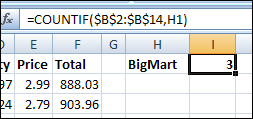
The COUNTIF formula returns 3, the same result that you got by typing the text in the formula.
Count non-exact matches
In the sales plan data that I worked on, there were a few variations on some customer spellings, and I wanted to count all of them. In the screenshot at the start of this article, you can see that BigMart is also listed as Big-Mart and Big Mart.
Use the * wildcard
To count all the variations, you can use the wildcard character, *, to represent any characters, or no characters, in the text string. For example, if cell H1 contains the customer name with a wildcard, Big*Mart, use this formula to count all the variations.
=COUNTIF($B$2:$B$14, H1)
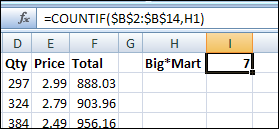
The COUNTIF formula returns 7, because it counts BigMart, Big-Mart and Big Mart.
Use the ? wildcard
If you use the ? wildcard character instead of the * wildcard character, it represents one character.
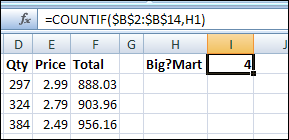
Now the COUNTIF formula returns 4, because it counts Big-Mart and Big Mart, but not BigMart. It doesn’t count BigMart, because there isn’t a character between the g and the M.
More COUNTIF Examples
For a few more examples of counting cells with specific text, visit the Excel Count Functions page on my Contextures website.
_______________
I have seen all the great help and was hoping to get some myself. LOL. I have a spreadsheet that shows customers, example “Paul Pets”. Some of these fields are strikethrough and some not. Is there a way to add all the fields without the strikethrough and then subtract the strikethroughs? This is only one customer of many. Thanks.
The built-in functions, such as COUNTIF, can’t detect strikethrough, and count those cells. You could create a User Defined Function, and there are a few examples in this thread on the Microsoft Excel forum:
http://answers.microsoft.com/en-us/office/forum/office_2010-excel/how-to-count-strikethrough-cells/273feb61-ae99-458e-8bb0-aae68838815d
Another suggestion…
If you’re striking through the entire contents of the cell, I’d add another column and use an indicator (1, true, complete). Then you can use conditional formatting to strike through that other cell.
And you can use =countif(), =sum() or other functions to count that column.
The good news is that this would make subtotals and autofilters show nicer counts.
Yes, that’s a much better idea, thanks!
I want to count same text cells excluding strike through cells have same text e.g
cell#1 khan
Cell#2 khan
cell#3 ATM
cell#4 khan(strike through)
cell#5 khan
what command i should use that it would count only cell which have khan excluding strike through
here text ” khan’ as “ATM’etc could be changed and currently i am using formula countif() but it counts all cells not excludes strike through
@jazi, please see Paul’s question about strikethrough, just above yours, and the replies to it.
http://blog.contextures.com/archives/2010/03/08/count-cells-with-specific-text-in-excel/#comment-168079
Very helpful, Thanks for this.
Hi,
I have two columns:
Column A = week number
Column B = finished tasks (I can do one task multiple times per day)
I need to count how many times I have created a database in week 34. I have a separate cell that contains the week number ($D$1).
Example:
How many times I have created a database this week ($D$1= “Week 34”)?
week 33 – created DB
week 34 – Created DB
week 34 – Research
week 34 – Emailing
week 34 – Created DB
=> cells shows: 2 (I have created two databases this week)
Thank you in advance for your help!
@Tereza, you can use COUNTIFS or SUMPRODUCT to calculate that.
There are examples on my Count Functions page:
http://www.contextures.com/xlFunctions04.html#count04
I need to count the dates in the month. It is contract dates. I need to count the number entered for the month. So the dates are varied. I need to count the total by the month so that count can be placed in yet another spreadsheet. I have played with COUNTIF but that was a bust. The originating spreadsheet will have dates for the calendar year. This needs to produce the total by the month. Any ideas???
hello,
iahve database that contains words , so how can i define spacific value for particular word pls help on it
thnks