
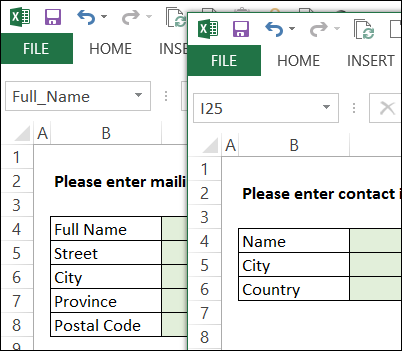
One of the new features in Excel 2013 is that each file opens in a separate window. Having each file in its own window makes it easier to compare files side-by-side, and most of the time I like the separate windows.
No Close All Files Command
One thing that I don’t like is that, unlike previous versions, there is no Exit button or command, to close all the files.
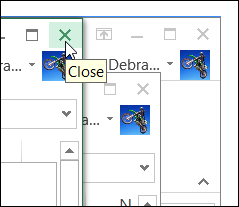
Each window has its own Close button, and if you’ve got lots of files open, it’s a pain to close each window individually.
Use the Taskbar Command
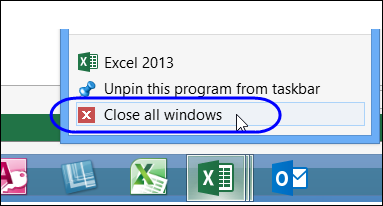
One solution is to use the Close All Windows command on the taskbar.
- Point to the Excel icon in the taskbar, and right-click on it
- In the popup menu, click Close All Windows
Add Commands to the QAT
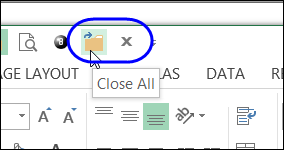
Another option is to move the Close All and Exit commands to the Quick Access Toolbar (QAT).
- Click the Customize arrow at the end of the QAT.
- Click More Commands
- In the Choose Commands From drop down, select All Commands
- In the list of commands, select Close All
- Click Add, to move the command to the QAT
- Then, select the Exit command, and add it to the QAT
- Click Close, to return to the Excel window.
Now you can click Close All, to close all the files, but leave Excel open. Or, click Exit, to close all the files, and close Excel.
I’ve added this Close All Excel Files tip to the Excel FAQ pages on my Contextures website.
Watch the Video
YOu can watch this short video, to see the steps for closing all the open files in Excel 2013.
________________
Hello! If you see NameOfDoc.xlsx:2 and NameOfDoc.xlsx:1, for example, you probably saved the workbook at one point while you were using a New Window. Just close one of the copies, and it should not prompt you to save anything, because the actual source is still open. However, you do want to resave the document once the workbook only has one instance open. That should prevent the doc from opening in two windows.
If I understood your question correction, another thing that could be going on is that you are pressing the TAB key for longer than necessary. IF you hold down the Alt key,and then just click tab, you’ll notice that the toggle can go through every open window when you use Alt with Tab. Instead, Ctrl F6 only toggles between documents of the same type.So use Ctrl F6 to move forward one document, and then SHIFT CTRL f6 to go backwards in the cycle. That way you only use 2 of the four documents.
LH
Hi, everybody
The simplest way, I’ve discovered today (the 2nd day when company deployed office 2013), is to hold Shift key and click the cross sign on top right corner (close window). The behavior to be the same as Alt+F4 on previous versions of excel. Even more there comes the fourth choice in appeared the window: Save all.
@Rostyslav, great tip, thanks!