
A couple of years ago, I posted an Excel Calorie Counter workbook, which has been very popular. In one of the comments, Autumn suggested that I add a recipe calculator to the file.
“I’m also looking to add a sheet within the workbook, that would work similarly to the Daily Entry sheet, where I can input a recipe to calculate the nutritional info for 1 serving of said recipe.”
And in the latest version, that Recipe Calculator has been added. Thanks Autumn, for the suggestion and the reminder. 😉
The new version also has protein, carbohydrates, fat and fibre data. If you download the workbook, please let me know what you think of the changes.
Enter the Recipe Ingredients
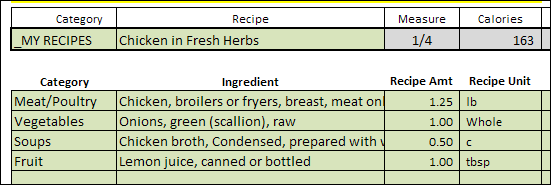
On the new RecipeCalc sheet, you can enter a Recipe Name and category, and the number of servings. Then, enter the ingredients and their categories, along with the required amounts.
Calculate the Amounts
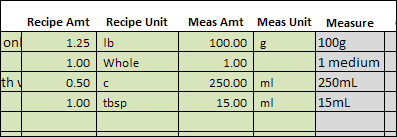
Also enter the amount shown in the Food List measurement, and the worksheet calculates a multiplier. This feature uses the Excel CONVERT function.
For example:
- In the first row shown below, the recipe calls for 1.25 pounds of chicken.
- The Food List has the nutrient information for 100 grams of chicken.
Add to the Food List
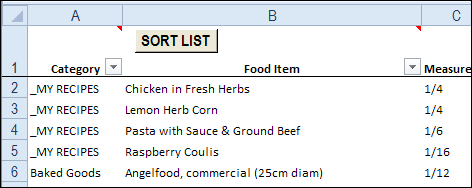
After you calculate the recipe’s nutrients per serving, you can copy the total amounts, and paste as values in the FoodList sheet.
I used the category _MY RECIPES, but you could use one of the standard categories, if you prefer.
Use Your Recipes in the Daily Data Entry
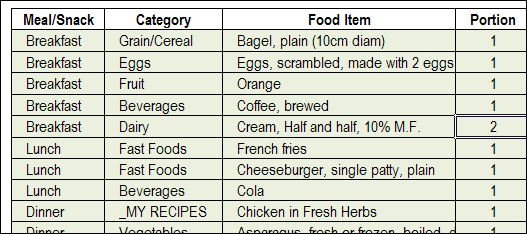
Once your recipes are added to the list, you can select them in the FoodEntry worksheet, where you enter your daily food choices.
Download the Excel Calorie Counter with Recipe Calculator
You can download a zipped copy of the Excel Calorie Counter with Recipe Calculator on the Contextures website. The file is in Excel 2007 format, and contains a macro. In the download section, look for “Excel Calorie Counter With Recipe Calculator”
As I mentioned when posting the original Calorie Counter, I’m not a medical professional, so use this workbook for entertainment purposes only. The calorie counts are from Health Canada, so the ingredients and calorie counts might be different where you live. Check the product labels for accurate numbers.
If you’re looking for more nutrient information, to add items to the food list, you can try these websites:
- http://nutritiondata.self.com/ (type a food in the search box at top right)
- mynetdiary.com (sign-up is required, free membership available)
- http://www.exercise4weightloss.com/weight-watchers-points.html (pdf files with restaurant foods at bottom of page)
Send Your Feedback
This is a beta version of the Recipe Calculator, and I have a few ideas for improving it. I’d appreciate your thoughts too. If you download the file, and test it, please let me know if you have any suggestions for making it easier to use.
__________________
thank you for this helpful excel file. I’m wondering if there is anyway I can use this file in excel online because it was fully working only in the desktop. i’ve tried to upload the file to google sheet and online excel< neither of them workd as the desktop.
thank you for this helpful file. if you can add total percentage for macros that would be great.
I’ve tried to upload the file to google sheet and online excel, neither of them worked as the desktop excel. In both google sheet and online excel it does not show the calorie after picking the food.
Thanks, Zak, and the macros in the Excel file won’t work in the online version of Excel or in Google Sheets.
Thank you so much for this invaluable tool! Is it possible to me to add a nutrient—like sodium—without messing up the macro? I’ve searched and searched the internet and the App Store and nothing comes even close—blessings!
You’re welcome, and there are steps for updating a similar workbook and its macro, in this blog post:
https://contexturesblog.com/archives/2010/01/06/excel-calorie-counter/
Those steps might help you!
Awesomeness! And thank you for the quick reply.