
In a pivot table, you can choose to show or hide the grand totals, but you can’t change their position. However, with a quick and easy workaround (no programming required), you can show the grand total at top of pivot table, for rhe pivot table columns.
Here’s a screen shot with a Grand Total at the top of a pivot table. It was created with this workaround.
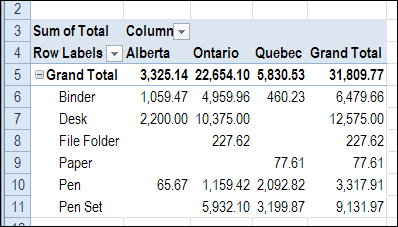
Unfortunately, there’s nothing similar that will create a grand total for rows at the left side of the pivot table.
Read the Instructions
To see the written instructions, please visit the Contextures website, and go to the Pivot Table Grand Totals page.
There is also a sample file on that page, that you can download.
Watch the Video
To see the steps for creating a grand total at the top of a pivot table, watch this short video.
__________________
Debra, you are always my go-to person for excel tips. Thanks again for such an easy fix for something that I would not have thought of and certainly needed!
Thanks Amy, glad you liked it.
Hi
I couldn’t get this to work when I had 2 value fields (ie. two fields being summed) – with sigma values in the rows.
It was ok with just one value ,not with 2
Thanks
You can also use a formula in the row between the report filter drop down box and the Row Labels drop down box.
The formula is =VLOOKUP(“Grand Total”,$A$4:$Z$1000,COLUMN(),FALSE). The range $A$4:$Z$1000 is determined by how you pivot table
looks. Then just copy that formula across as many columns as you need.
Looks like this: copied formula across Row 2 as far as needed
Col A Col B Col C
1 Reports Filter
2 Grand Total =VLOOKUP(“Grand Total”,$A$5:$BZ$1000,COLUMN(),FALSE) =VLOOKUP(“Grand Total”,$A$5:$BZ$1000,COLUMN(),FALSE)
3 Rows Label
Thank you! Is there a way to do this with a named Excel table? I am using Excel 2013. Thanks!