
When you add comments to an Excel worksheet, they pop up to the top right of the cell, when you point to a cell with comments.
That’s fine most of the time, but if the cell is near the top or right of the window, you might not be able to read the comment.
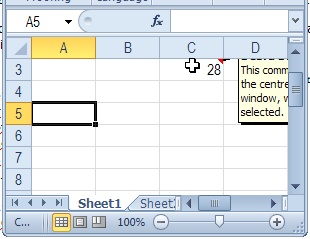
Move Comments with Macro
Unfortunately, you can’t control the comment’s popup position, but with a bit of programming, you can show the comment in the centre of the screen, when you click on the cell.
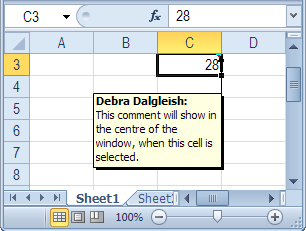
Centre Excel Comments Code
Paste the following code onto a worksheet module. Then, when you click on a cell that contains a comment, that comment is shown in the centre of the active window’s visible range.
Private Sub Worksheet_SelectionChange(ByVal Target As Range)
 'www.contextures.com/xlcomments03.html
 Dim rng As Range
 Dim cTop As Long
 Dim cWidth As Long
 Dim cmt As Comment
 Dim sh As Shape
Application.DisplayCommentIndicator _
      = xlCommentIndicatorOnly
Set rng = ActiveWindow.VisibleRange
cTop = rng.Top + rng.Height / 2
cWidth = rng.Left + rng.Width / 2
If ActiveCell.Comment Is Nothing Then
  'do nothing
Else
   Set cmt = ActiveCell.Comment
   Set sh = cmt.Shape
   sh.Top = cTop - sh.Height / 2
   sh.Left = cWidth - sh.Width / 2
   cmt.Visible = True
End If
End Sub
More Excel Comment Macros
For more Excel comment macros, please visit the Excel Comment VBA page on the Contextures website.
______________
It’s great that you have a section on comment control using VBA – the comments concept is great, but seems dated now in terms of its execution.
With code like that above, which runs extremely frequently, I’d tend to add in a line to check the current position of the comment before setting it. Also, the same could be done to check the value of
Application.DisplayCommentIndicatorbefore setting it repeatedly.Hi, Do you have code that works when you hoover over the cell and not have to click on it. This way, I can protect the workbook.
Thanks!
@Brian, if you allow clicking on locked cells, the code should work on a protected sheet. I don’t have any code that would run when you hover over the cell.
Thanks Debra.