
Excel was launched in 1985, so it hasn’t been around for 40,000 days. However, Excel’s date system starts at January 1, 1900 (day 1), and today is day 40,000 in that date system.
Not on the Mac
It’s not Day 40000 for Excel Mac users though – its default date system starts at January 1, 1904 (day 0).
So, if you’re using Excel for the Mac, you won’t hit the day 40000 milestone for another four years.
The two dating systems are explained in the Microsoft Knowledgebase article at this link: Description of the differences between the 1900 date system and the 1904 date system in Excel.
Switch to a Different Date System
Whether you’re using Excel on a Windows machine or on a Mac, you can switch from the default date system.
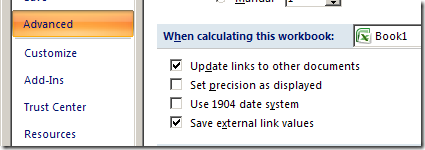
Follow the steps below, if you want to switch to the 1904 Date System in Excel 2007:
- Click the Office Button, then click Excel Options
- Click the Advanced category
- Scroll down to the section titled, When calculating this workbook
- Add a check mark to Use 1904 date system.
- Click OK
Keyboard Shortcuts for Dates
If you use these shortcuts, you’ll have more time available for celebrating the 40,000 day milestone.
- Enter today’s date: Ctrl + ;
- Format a date as dd-mmm-yy: Ctrl + #
______________________
10 thoughts on “Celebrating Excel Day 40000”